- The check is the site’s rule: Cloudflare runs a script in your browser, and most visitors pass without doing anything.
- Passing sets a cf_clearance cookie that lasts 30 minutes by default, which is why the check comes back when the cookie expires or is blocked.
- It loops when something stops the script or the cookie: extensions, JavaScript off, an old browser, a VPN or busy shared address, a weak connection, a wrong clock, or automation.
- Fix it in order: wait, update, disable extensions, try another browser or network, switch off the VPN, fix the clock, then send the site the error code and Ray ID.
- A real human check never asks you to press Windows+R, open a terminal or paste a command: those fake pages (ClickFix) install malware.
On this page
The check is not a verdict on you. A site’s rule has met something in your browser or connection that looks automated, and Cloudflare is asking your browser to prove otherwise. Most people never notice it: Cloudflare says “Most visitors will pass Challenges automatically without interaction.” (Cloudflare Docs) When it keeps coming back, the cause is nearly always one of a short list of things, and Cloudflare publishes that list. Below: what the check is, why it loops, the fixes in the order worth trying, what the error codes mean, and how to tell a real check from the fake ones that install malware. The outside facts were checked on 21 November 2026.
What the “Verify you are human” page is
If the page carries Cloudflare’s name, it is a Cloudflare challenge: a check that a site behind Cloudflare puts in front of a visit. The site decides when it appears: “Challenges are triggered by a rule in the Web Application Firewall (WAF), Bot Management, or Rate limiting.” The full-page version “acts as a gate between the visitor and your website or application while Cloudflare verifies the authenticity of the visitor”, and “The visitor cannot reach their destination without passing the challenge.” (Cloudflare Docs)
There is no puzzle to solve: “Cloudflare does not use CAPTCHA puzzles or visual tests like selecting objects or typing distorted characters.” (Cloudflare Docs) Your browser runs a script, which “typically takes less than five seconds”. If Cloudflare “detects non-human attributes from the visitor's browser, they may be required to interact with the challenge to solve it”, for example by ticking a box (Cloudflare Docs).
When you pass, “Cloudflare sets a cf_clearance cookie in their browser”, and “By default, the cf_clearance cookie has a lifetime of 30 minutes.” Sites can change that; Cloudflare recommends 15 to 45 minutes (Cloudflare Docs). That cookie is your pass. When it expires, when something deletes it, or when the browser never keeps it, you are asked again.
Does your visit look automated?
The live check on our homepage runs on your own visit and shows whether it reads as a bot, a VPN or a proxy, and what a website would decide, with no sign-up.
Why it keeps looping
Cloudflare’s own list of reasons a check cannot be completed, with what it says about each (Cloudflare Docs):
- An extension or a setting blocks it. “Some browser settings or extensions may block the scripts needed to execute the challenge.” The usual suspects are “browser extensions, such as ad blockers or privacy tools” (Cloudflare Docs). An extension or a privacy setting that deletes or refuses cookies has the same effect: the pass cannot be kept, so every page asks again.
- JavaScript is off. “Turnstile relies on JavaScript to function properly.” (Turnstile is Cloudflare’s name for its check.)
- The browser is too old, or not supported. “Challenges are not supported by Microsoft Internet Explorer” (Cloudflare Docs), and support is limited for “Browsers or operating systems that are more than five years old or have not received security updates in over two years.” (Cloudflare Docs)
- A VPN, a proxy or a busy shared address. “If your IP address has a poor reputation (often seen with shared VPNs or corporate proxies), try switching to a different, trusted network connection.” (Cloudflare Docs) An address can earn that reputation without you knowing: apps that sell your spare bandwidth, such as Honeygain, warn in their terms that their customers’ data gathering “may result in you getting asked to solve captchas when visiting certain websites” (Honeygain Terms of Use; more in is Honeygain safe?).
- A weak connection. “Poor or unstable network connections can prevent the challenge from being completed.”
- Your clock is wrong. Two of Cloudflare’s error codes point straight at it (the table below).
- The browser looks automated. “If Turnstile suspects bot-like behavior, you may encounter repeated challenges for verification”, which Cloudflare says happens “in very specific cases where we detect strong bot signals.” Browser automation tools “such as Selenium, Puppeteer, Playwright, and Cypress, are not supported for solving production challenges”, and developer tools that apply “network, user-agent, viewport, or JavaScript overrides” should be switched off (Cloudflare Docs).
- The site itself. Cloudflare warns site owners that “Using Cloudflare Challenges along with Rules features may cause challenge loops.” (Cloudflare Docs) If the loop happens on every browser, device and network you try, only the site can fix it.
How to fix it, in the order worth trying
- Wait a few seconds before you reload. The check usually finishes in under five seconds on its own, and a reload starts it over.
- Update your browser. Cloudflare’s first fix: “Ensure your web browser is updated to the latest stable version for full compatibility with modern challenge technologies.” (Cloudflare Docs)
- Turn off your extensions. “Temporarily disable all extensions and reload the page.” Start with ad blockers, privacy tools, VPN extensions and anything that changes how the browser describes itself.
- Turn JavaScript and cookies back on for the site, if you switched them off.
- Try a private window, then another browser or another device. Cloudflare lists both steps; if one browser passes and the other loops, the difference is in the browser that loops.
- Switch off your VPN or proxy (“Disable them temporarily to test.”), then try another network, for example your phone’s mobile hotspot (Cloudflare Docs).
- Set your date and time to automatic. A clock that is off fails the check (see the error codes).
- Still stuck? Tell the site. Cloudflare’s advice: “contact the website administrator with the error code and Ray ID or submit a feedback report through the Turnstile widget by selecting Submit Feedback.” (Cloudflare Docs) The rule that shows the check is the site’s, so the site is the one that can change it.
On an iPhone, iPad or Mac, keep the system up to date. Since iOS 16 and macOS 13, Apple devices can send Cloudflare a Private Access Token instead: “You won't see a CAPTCHA on a supported iOS or Mac device” (Cloudflare blog, June 2022).
What the error codes mean
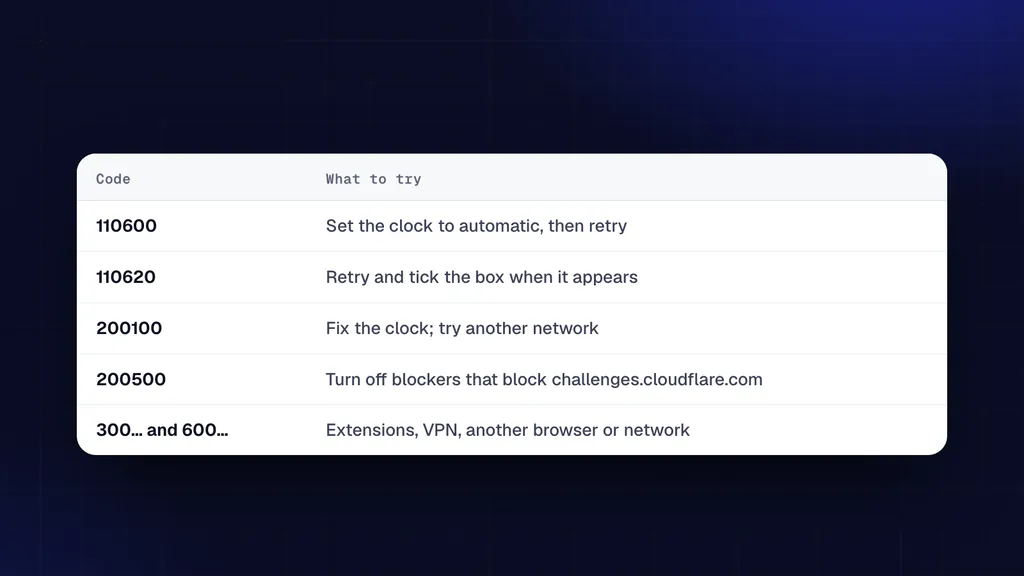
When the check fails it may show a code. These are the ones Cloudflare explains for visitors (Cloudflare Docs):
| Code | What Cloudflare says it means | What to try |
|---|---|---|
| 110600 | “Challenge timed out”: “The visitor's clock may be wrong, or the challenge took too long.” | Set the clock to automatic, then retry |
| 110620 | “Interaction timed out”: the box was not ticked in time | Retry and tick the box when it appears |
| 200100 | “Clock or cache problem” | Fix the clock; try another network |
| 200500 | “Iframe load error”: the check could not load | Turn off blockers that block challenges.cloudflare.com |
| 300… and 600… | “Generic challenge failure”: “Bot behavior detected.” | Extensions, VPN, another browser or network |
Codes such as 600010 belong to the last row: “When an error code is marked with *, the remaining digits can vary and are for internal use.” (Cloudflare Docs) Write the full code down anyway, with the Ray ID, if you contact the site.
Fake “Verify you are human” pages: the ClickFix scam
Not every “Verify you are human” box is real. Since at least 2024 criminals have used fake ones to install malware. Proofpoint reported “threat actors have been observed recently using a fake CAPTCHA themed ClickFix technique” “that pretends to validate the user with a "Verify You Are Human" (CAPTCHA) check.” The page may “automatically copy and paste a malicious script into the PowerShell terminal, or the Windows Run dialog box”, or “provide a user with instructions on how to manually open PowerShell and copy and paste the provided command.” What it installs includes “AsyncRAT, Danabot, DarkGate, Lumma Stealer, NetSupport, and more.” (Proofpoint, November 2024)
Microsoft describes the same trick: “The ClickFix technique attempts to trick users into running malicious commands on their devices”, usually through “The Windows Run dialog (Win + R)”. One lure “even spoofs Cloudflare to further trick users into thinking that the verification step is legitimate”, and in June 2025 a campaign was reported “targeting macOS users to deliver Atomic macOS Stealer (AMOS).” Microsoft’s advice: “Ensure users are aware of what they copy and paste.” (Microsoft Threat Intelligence, August 2025)
The rule is simple: a real human check never asks you to type, paste or run anything. Cloudflare’s check runs inside the browser and passes most people with no interaction at all; at most it asks for a click. If a page tells you to press Windows+R, open Terminal or PowerShell, or paste something it has copied for you, close the page. If you have already run the command, disconnect the computer from the internet, run a full scan with your security software, and change your important passwords from another device.
What a site sees, and how it can check you without a box
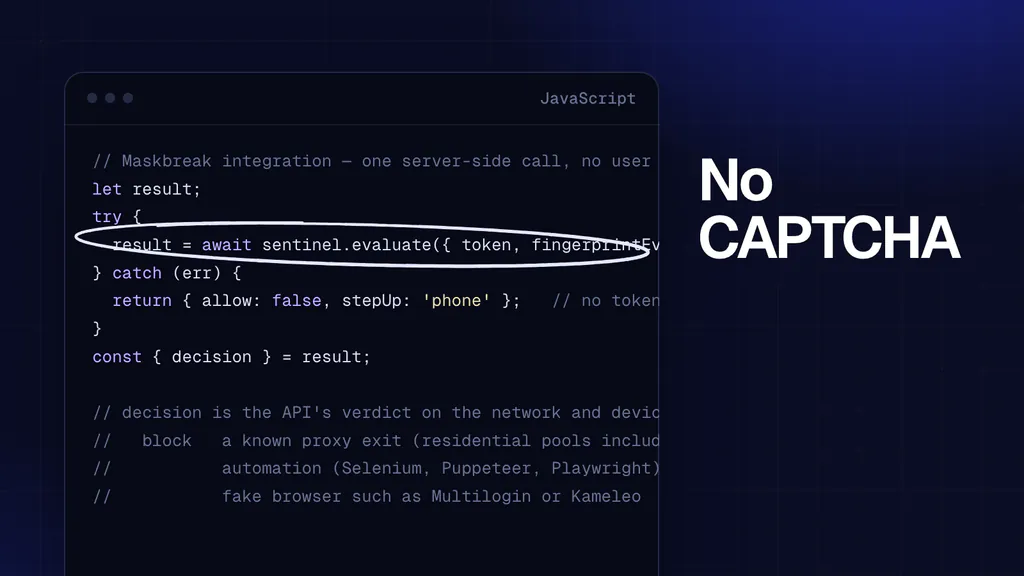
A site that wants to stop bots does not have to stop people with a box. Maskbreak, the fraud detection API this blog belongs to, checks the connection and the browser in the background and answers the site with allow, review or block: a VPN on its own leads to a review rather than a block, while a known proxy exit or an automated browser is a block. The visitor sees nothing. If you keep getting stopped on many sites, the live check on Maskbreak’s homepage and the VPN checker run those checks on your own visit and show what they found: the decision, whether your connection was flagged as a VPN, a proxy or Tor, and what the browser check saw. A clean result means this checker did not flag you at that moment, not that no site will. For the same problem on Google, see “unusual traffic from your computer network”; for site owners, bot detection without CAPTCHAs explains the approach.
Questions people ask
- Why does Cloudflare keep asking me to verify I’m human?
- Because something in your browser or connection stops the check from finishing or from being remembered. Cloudflare lists browser extensions such as ad blockers and privacy tools, JavaScript turned off, unsupported or outdated browsers, VPNs and shared addresses with a poor reputation, unstable connections and bot-like behaviour. A passed check is remembered in a cookie that lasts 30 minutes by default.
- How do I fix the “Verify you are human” loop?
- Wait a few seconds before reloading, update your browser, turn off your extensions, make sure JavaScript and cookies are on, try a private window or another browser, switch off your VPN or proxy, try another network, and set your clock to automatic. If none of that works, send the site the error code and the Ray ID.
- Can a VPN cause the Cloudflare loop?
- Yes. Cloudflare says a poor IP reputation is often seen with shared VPNs and corporate proxies, and suggests switching off VPNs and proxies to test and trying a different network. VPN browser extensions can also cause extra checks.
- Why does the check loop in one browser but not another?
- The difference is in the browser that loops: usually an extension, a privacy setting that blocks the cookie or the script, JavaScript turned off, or an outdated version. Turn its extensions off one by one, or reset its settings, to find the cause.
- Is “Verify you are human” a scam?
- The real check is not: it runs in your browser and at most asks for a click. Fake ones exist, though. The ClickFix scam shows a fake “Verify you are human” box and tells you to press Windows+R or open PowerShell or Terminal and paste a command, which installs malware. A real check never asks you to type, paste or run anything.
- What does Cloudflare error 600010 mean?
- Cloudflare groups codes that start with 600 as a generic challenge failure where bot behaviour was detected; the remaining digits are for its internal use. Try turning off extensions and your VPN, another browser or another network, and if it persists send the code and the Ray ID to the site.
- How long does a passed Cloudflare check last?
- By default 30 minutes. Passing sets a cookie called cf_clearance, and sites can change how long it lasts; Cloudflare recommends between 15 and 45 minutes.
- Can Cloudflare unblock me?
- Cloudflare tells visitors who stay stuck to contact the website administrator with the error code and the Ray ID, or to submit feedback through the check itself. The rule that shows the check is the site’s own.
Check your visitors for bots
One call from your server before signup, login or checkout returns allow, review or block, with every reason listed: automation, a fake browser, a VPN, a proxy or Tor. The Free plan includes 10,000 visitor checks a month with no card, and setup starts in watch mode, so nothing is blocked until you turn blocking on.