- Honeygain is a real company that pays: by its own estimate around $3 to $10 a month on one device in the US, UK or Western Europe, with a $20 minimum payout.
- The app from Honeygain’s own site is not a virus, but criminals have spread fake and patched installers that send the payouts to the attacker.
- While it runs, other companies’ traffic leaves through your connection and your address, and you cannot see what that traffic does.
- The risks on record: your address is the one that gets logged, more CAPTCHAs and blocks, an internet contract that may forbid it, and data you pay for.
- Maskbreak’s free VPN checker shows whether proxy networks have been seen relaying traffic through your IPv4 address in the last 30 days.
On this page
Short answer: Honeygain is a real company that pays real money, and the app from its own site is not a virus. Whether it is safe for you depends on what you agree to. While it runs, other companies’ web traffic leaves the internet through your connection, from your address. You cannot see that traffic, your internet provider may forbid it, and the address it uses is the same one every website sees when you visit. Below: what Honeygain and apps like it do, what they pay, the risks on record, and how to stop it and check your address. The outside facts were checked on 21 November 2026.
What Honeygain actually does
Honeygain describes itself as “a passive income app that pays you for sharing your unused internet bandwidth”. In its own words, “a share of your idle bandwidth goes to vetted business partners who route everyday web traffic through your device”, for tasks “such as ad verification, price comparison, or gathering publicly available web data”, and “While the app runs, partner traffic passes through your IP address.” It has apps for Windows, macOS, Linux and Android, and none for the iPhone (Honeygain).
Its terms put it more plainly: “The user’s device becomes a gateway that enables Honeygain to send traffic using the device and its Internet traffic.” The customers are “companies specializing in web and market analytics, SEO monitoring, brand protection, market research, cybersecurity, etc.”, and the terms say what that can mean for you: “Other Clients might gather data from the web, which may result in you getting asked to solve captchas when visiting certain websites.” Others “might also use our service to access or provide streaming services” (Honeygain Terms of Use).
That is what a residential proxy is: a business’s traffic sent out through an ordinary home connection so that it looks like a person browsing (what a residential proxy is). Installing Honeygain makes your connection one of those exits, by your own choice and for pay. The same thing happens without anyone choosing it when an ordinary app or a cheap device does it in secret; that side of the story is in is my phone being used as a proxy?
Is your connection flagged as a proxy?
Open the live check on our homepage from your own connection, or through a proxy you want to test, and see whether the visit reads as a proxy, with no sign-up.
Is Honeygain legit, and is it worth it?
It is a working business, not a scam that never pays. Honeygain calls itself “a legitimate, established company that has operated since 2019” (Honeygain). Its terms set a “minimum withdrawal threshold ($20 or its equivalent)”, pay out “through third party payment services providers” and admit only users who are at least 18 (Honeygain Terms of Use).
The money is small, by Honeygain’s own estimate: in the US, UK or Western Europe “around $3 to $10 a month on one device, reaching the $20 minimum within a few weeks”, and “closer to $1 to $3 a month on one device” in regions with less demand. It adds that “those figures are illustrative and depend on region and uptime” (Honeygain).
Read three more things before you count on it. The terms say: “WE CANNOT GUARANTEE AND DO NOT PROMISE ANY SPECIFIC RESULTS”. Earnings can expire: “IF THE APPLICATION IS NOT USED BY THE USER FOR MORE THAN SIX MONTHS, THE EARNINGS ACCRUED BY SUCH USER SHALL BE DEEMED INVALID, EXPIRED AND WILL NOT BE PAID OUT”, and earnings that reached the threshold but were not cashed out within 24 months may be written off (Honeygain Terms of Use). And it spends your data: “Honeygain uses your data allowance”, so Honeygain itself recommends unlimited home Wi-Fi over a capped plan. A VPN does not get around any of this: “Most VPNs assign a datacenter IP, which isn't permitted and can lead to an account being suspended.” (Honeygain)
Is Honeygain a virus?
The app from Honeygain’s own site is not a virus, and Honeygain says so: it describes itself as “whitelisted by major antivirus engines”, and its security page says the app “does not access personal content, track browsing activity, or collect private information” (Honeygain Security). Those are Honeygain’s own statements; we have not tested them. Two things on record explain why people ask anyway.
Security firms treat the whole category with suspicion. Trend Micro writes that “these network sharing apps are classified as riskware applications that we call proxyware”. It recorded traffic coming out of exit nodes of several such services from January to September 2022, and concluded: “This is why we don't recommend participating in such schemes.” (Trend Micro)
Criminals have installed these apps on other people’s computers. In 2021 Cisco Talos found “malicious executables that pose as installers for legitimate proxyware applications like Honeygain”, and a campaign in which the installer “drops a patched version of the Honeygain client, an XMRig miner and an information stealer”, then registers the client “with the attacker's Honeygain account”, so the attacker collects the payouts for the victim’s bandwidth. Talos lists other platforms of the same kind: “Honeygain, IPRoyal Pawns, Nanowire, Peer2Profit and PacketStream” (Cisco Talos). So get the app only from the company’s own site, and if you find one of these apps on a computer where nobody in the house installed it, treat that computer as compromised.
The real risks of sharing your connection
The question that matters is less whether the app is malicious than what happens to the traffic it lets through. Four risks are on record.
- Strangers’ traffic leaves from your address, and you cannot see it. People who share have no way of “even monitoring what kind of traffic goes via their exit node”, Trend Micro found. If that traffic does something wrong, “it would be their IP address that got logged on those websites”, and “you bear the brunt of the risk if they perform illegal, abusive, or attack related actions”. Most of what Trend Micro recorded was ordinary (“most of it is legitimate”), but it also saw attempts to probe websites for SQL injection, click fraud and bulk account registration come out of these services’ exit nodes (Trend Micro).
- Your address gets a worse reputation. Websites judge a visit partly by its address, and an address that proxy customers use starts to look like one. Honeygain’s terms warn you may be “asked to solve captchas when visiting certain websites”, and Cloudflare tells visitors that a poor IP reputation is “often seen with shared VPNs or corporate proxies” (Cloudflare Docs). If you are already stuck in CAPTCHAs, see why websites think you’re a bot and the “Verify you are human” loop. Fraud checks go further: under the default policy of Maskbreak, the fraud detection API this blog belongs to, a visit from a known proxy exit is blocked, and that includes a home connection rented out as a residential proxy.
- Your internet contract may forbid it. Honeygain itself says: “Some ISPs restrict sharing or reselling bandwidth.” (Honeygain) Its terms make you confirm, whenever the app is active, that “you have reviewed the terms of service of your internet service provider, mobile network operator” and that “sharing Internet traffic is not prohibited by them”, and they warn that your provider “may treat the sharing as a breach of its terms and may throttle, suspend or terminate your service” (Honeygain Terms of Use). EarnApp’s terms likewise shut out anyone whose agreement with their internet provider prohibits such arrangements (EarnApp terms).
- It costs you data and speed. Talos reported users saying “their home networks were experiencing service degradation”, and warned that sharing “could also lead to direct financial losses in cases where the victim is on a limited data plan” (Cisco Talos).
EarnApp, Pawns.app and the others
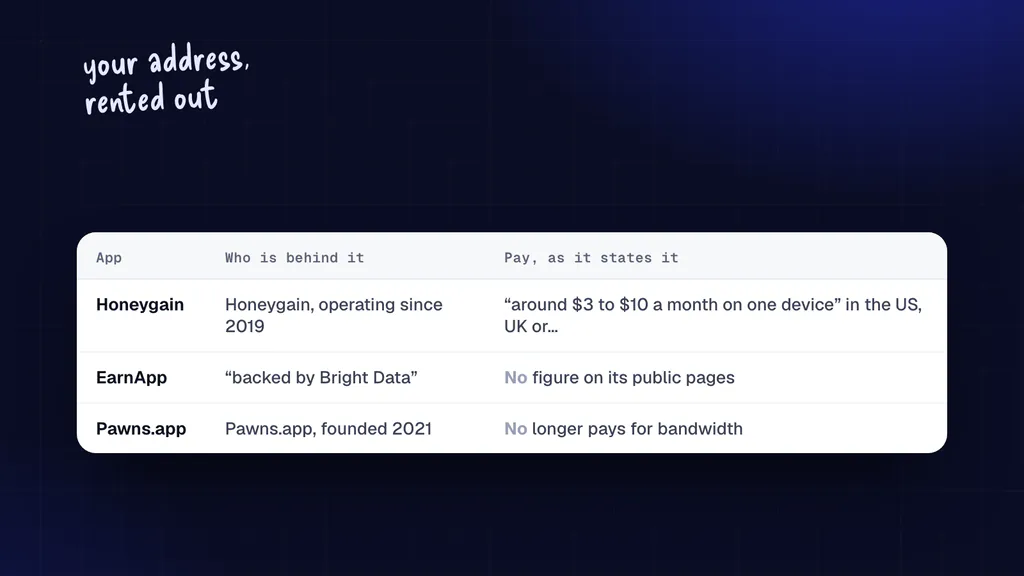
The same trade runs under many names: passive income, bandwidth sharing, internet sharing. Here is what three of these apps say about themselves on their own pages, read on 21 November 2026.
| App | Who is behind it | What it says it does with your connection | Pay, as it states it |
|---|---|---|---|
| Honeygain | Honeygain, operating since 2019 | Partner traffic “passes through your IP address” | “around $3 to $10 a month on one device” in the US, UK or Western Europe; $20 minimum |
| EarnApp | “backed by Bright Data” | Uses your IP address “to download a few web pages in the background” for Bright Data’s customers | No figure on its public pages |
| Pawns.app | Pawns.app, founded 2021 | “does not offer internet bandwidth sharing” as of 2026 | No longer pays for bandwidth |
EarnApp says it “is backed by Bright Data” (EarnApp). Its terms say it “uses your IP address and free resources to download a few web pages in the background”, that “The webpages are then sent to Bright Data’s customers”, that it “customizes your network settings by modifying the system settings on your device” and that it “is intended for use on personal devices only”. Bright Data’s liability to you is “limited to US$50” (EarnApp terms, last updated 1 January 2024). Its iPhone app is listed as coming soon. Everything in the risk list above applies to it in the same way.
Pawns.app, which Talos named in 2021, has left this business: “As of 2026, Pawns.app does not offer internet bandwidth sharing.” and “This feature was discontinued and is not associated with Pawns.app anymore.” (Pawns.app) Trend Micro’s list of services of the kind also names PacketStream, Peer2Profit and Traffmonetizer.
How to stop it, and check your address
- Cash out first if you have reached the threshold, because unused earnings expire.
- Uninstall the app on every device. Honeygain says “You can pause or disable Honeygain anytime directly from the app or uninstall it completely” (Honeygain Security). Check every computer and Android device at home, not only your own: a phone or a TV box can share your connection without any app you chose, as the phone guide explains.
- Check what websites see. The live check on Maskbreak’s homepage and the VPN checker run Maskbreak’s checks on your own visit. For an IPv4 address the VPN checker also looks the address up in data on residential proxy exits: if proxy networks have been seen relaying traffic through it, it says “Residential proxy exit”, names up to three of them and says on how many of the last 30 days.
- Give it time. Those sightings cover the last 30 days, so an address can still show up for a while after the sharing stops.
Read the result with care. A clean result means this checker did not flag your address at that moment, not that no site will. A flag is not proof that a device at home is sharing either: a mobile network can put many customers behind one address. And an address typed into a lookup box tells you much less: Maskbreak’s lookup of an address checks only the Tor exit list and published cloud ranges.
The bottom line
Honeygain does what it says: it pays a few dollars a month for letting other companies use your connection. It is legitimate in that sense, and the app from its own site is not a virus. It is not risk-free. The traffic is not yours, you cannot see it, it leaves from the address your bank, your email and every site you use see as yours, and your internet provider may not allow it. If a few dollars a month is worth that to you, use a connection you pay for yourself, with no data cap, and read your provider’s terms first. If it is not, uninstall it and check your address.
Questions people ask
- Is Honeygain safe?
- Honeygain is a real company, and the app from its own site is not a virus by its own account and by the antivirus whitelisting it claims. It is not risk-free: while it runs, other companies’ web traffic leaves through your connection from your address, you cannot see that traffic, your internet provider may forbid it, and your address can start getting more CAPTCHAs. Use it only on a connection you pay for, with no data cap, after reading your provider’s terms.
- Is Honeygain legit or a scam?
- It is legitimate in the sense that it pays. Honeygain says it has operated since 2019, pays out once you reach $20, and estimates around $3 to $10 a month on one device in the US, UK or Western Europe, and $1 to $3 elsewhere. Its terms also say it does not promise any specific results, and earnings expire if the app goes unused for more than six months.
- Is Honeygain a virus?
- Not the app from Honeygain’s own site. The risk is copies from elsewhere: in 2021 Cisco Talos found fake Honeygain installers and malware that installed a patched Honeygain client on victims’ computers and registered it to the attacker’s account. If one of these apps turns up on a computer where nobody installed it, treat that computer as compromised.
- Can Honeygain get me in trouble?
- It can. The traffic it routes leaves from your address, so if that traffic does something wrong, your address is the one in the website’s logs, as Trend Micro points out. Honeygain’s own terms also warn that your internet provider may treat sharing as a breach of its terms and throttle, suspend or terminate your service.
- Why do I get more CAPTCHAs since installing Honeygain?
- Because your address now carries other companies’ traffic, and websites judge visits partly by their address. Honeygain’s terms say its clients’ data gathering may result in you being asked to solve captchas on some websites. Uninstalling the app stops the traffic; the address can take some time to look ordinary again.
- Is EarnApp safe?
- EarnApp is backed by Bright Data, and its terms say it uses your IP address to download web pages in the background that are then sent to Bright Data’s customers. The same risks apply as with Honeygain: traffic you cannot see leaves from your address. Its terms say it is meant for personal devices only and limit Bright Data’s liability to you to 50 US dollars.
- Does Honeygain work on iPhone?
- No. Honeygain lists apps for Windows, macOS, Linux and Android only. EarnApp lists its iPhone app as coming soon.
Catch proxies at your signup
One call from your server returns allow, review or block for each visit, with the proxy service named when it’s known and every reason listed. The Free plan includes 10,000 visitor checks a month with no card, and setup starts in watch mode, so nothing is blocked until you turn blocking on.