- Bots cost money at the signup, login, checkout and contact forms, so check the submission there instead of blocking page views.
- Verify search crawlers with DNS as the search engine documents it, never by the name in the user agent, and keep public pages open to them.
robots.txt, rate limits, IP blocklists and CAPTCHAs each stop something; rotating proxies, spread-out requests and solving services get past them.- Block automated browsers, fake browsers, proxies and Tor exits at a protected form; send a VPN on its own to review, never to a block.
- Start in watch mode, compare a few days of decisions with what you know, then enforce one form at a time.
On this page
The bots that cost a website money rarely do it by reading pages. They post to the signup form, try passwords at the login, test cards at checkout and fill the contact form with spam. So the way to block bots without turning away customers is to protect those actions: let verified search crawlers read your public pages, use rate limits and a firewall for noisy floods, and decide whether to allow, review or block each submission of a protected form.
A shop losing stock to hoarding scripts, or an app filling up with fake registrations, will not fix the damage by blocking page views. An edge bot blocker controls request volume; a check at the form judges the submission. If you have both problems, use both.
Decide which bots you actually want to stop
Some automated requests help people find you. Judge a request by its source and by the action it tries to take, not by the fact that no person typed it.
| Traffic | What it does | A sensible policy |
|---|---|---|
| Verified search crawlers | Index public content | Allow on public pages; keep private actions protected |
| AI crawlers | Collect or retrieve public content | Allow, limit or refuse by your publishing policy |
| Unknown scrapers | Fetch pages, feeds or product data over and over | Rate-limit or block at the edge |
| Form-abuse automation | Fake signups, password testing, card testing, lead spam | Check at the form and enforce the decision on your server |
| Real visitors with privacy tools | Browse or submit a form through a VPN | Allow or review on the whole picture, never block for the VPN alone |
Verify search crawlers instead of trusting their names
Googlebot and Bingbot should be able to reach your public content. Any client can put Googlebot in its user-agent header. Before you give a crawler an exception, verify the source. For Google, run a reverse DNS lookup on the visiting IP address. Check that the hostname is googlebot.com, google.com, googleusercontent.com or a subdomain of one of them. For a subdomain, include the separating dot when matching the suffix. Then check the name in the other direction:
“Run a forward DNS lookup on the domain name retrieved in step 1 using the host command on the retrieved domain name.”
The answer must be the address you started from. The same page lists the address ranges Google’s crawlers use, for checking at scale (Google Crawling Infrastructure: Verify Requests from Google Crawlers and Fetchers). A name that does not pass the check should get no exception.
Keep public posts and product pages open to verified crawlers. Your login, checkout and contact endpoints do not need that exception: search crawlers do not sign up, log in or check out. Blocking crawlers across the whole site is what keeps search engines away from content you want found.
Treat AI crawlers as a publishing decision
You may want some AI systems to find your articles while keeping others out. Set a policy per crawler and per section of the site. OpenAI runs separate crawlers for search and for training and says each setting “is independent of the others”. You can allow OAI-SearchBot so your pages can appear in ChatGPT’s search results while disallowing GPTBot for training (OpenAI: Overview of OpenAI Crawlers).
A robots.txt rule states that preference to crawlers that honour it. The standard itself says its rules “are not a form of access authorization” (RFC 9309: Robots Exclusion Protocol), so a firewall or server rule is what stops requests that ignore it. And a crawler policy does not secure a signup form: a script that fills in your form is not reading your robots.txt.
Try it on your own forms
One call before signup, login or checkout returns allow, review or block; the Free plan includes 10,000 visitor checks a month with no card, and setup starts in watch mode, which logs every decision and blocks no one until you turn blocking on.
What the common bot-blocking methods actually stop
Choose the control by the request you need to stop. Each one below works against something, and each one has a way around it.
| Method | Useful against | What gets past it, or needs care |
|---|---|---|
robots.txt | Crawlers that respect your published policy | Malicious bots ignore it; it denies nothing |
| Rate limits | Bursts at login, search, APIs and expensive pages | Requests spread over many addresses stay under per-IP limits; shared addresses hold real people |
| IP blocklists | Known abusive addresses and repeat offenders | Rotating residential and mobile proxies change the address; broad ranges catch customers |
| CAPTCHA or another challenge | Basic scripted submissions and some repeated abuse | Solving services and more capable automation pass; customers give up on hard challenges |
| Firewall (WAF) bot rules | Scans, suspicious paths and floods before your application runs | An edge rule cannot always tell whether one checkout attempt is fraud |
| User-agent filters | Cooperative crawlers and simple unwanted clients | A client can send any user agent it likes |
| A risk check at the form | Automated or disguised visitors submitting a protected action | Needs enforcement on your server and a safe path when the check cannot run |
Use the edge for volume and the form for intent
A web application firewall can stop repeated scans and rate-limit specific paths before requests reach your application. Give login pages, expensive site search and exposed API routes limits of their own instead of one threshold for every page.
An IP rule stops an attacker who keeps using a known address. Rotating proxies get past it, while a broad ban catches customers on shared networks; we wrote about how residential proxies carry credential stuffing past exactly these rules. A CAPTCHA slows basic form spam, and CAPTCHA farms sell the rest a way through. For credential stuffing or card testing, also judge the login or checkout attempt itself when it is submitted.
Avoid banning a whole country, hosting network or browser family as a shortcut. Such rules describe where a request seems to come from, not whether the person behind it is a buyer. Start with the smallest path or action that is being abused.
Protect the actions bots make money from
Find the action and the endpoint that processes it. Your page may draw the form, but a script can post straight to its server handler. Make the decision there, before you create an account, sign someone in, send a lead, hold stock or attempt a payment.
| Abuse | Where to check | What to look at |
|---|---|---|
| Fake accounts | The registration submission | The same device behind many accounts, automated browsers, proxies |
| Credential stuffing | The login submission | Bursts of failed logins with automation and proxy signals |
| Card testing | The checkout or payment attempt | Repeated attempts, changing identities, proxies |
| Lead spam | The contact or quote form submission | Automated browsers and repeat devices |
| Ticket or stock hoarding | Reservation and checkout | Repeated holds and submissions, not product-page views |
| Scraping | Public pages, feeds and search | Request rate and access patterns at the edge |
Read the browser and the connection together
Some automated visitors drive headless Chrome with Puppeteer, Playwright or Selenium. Others show a fake browser identity through an antidetect browser. A check of the browser finds these at the moment of submission, but the signal alone does not prove bad intent: your own tests and monitoring may use automation too.
A check of the connection shows whether the visit comes through a residential or mobile proxy, a VPN, a Tor exit or a cloud server. Real customers use VPNs, and approved integrations run from cloud servers, so weigh those signals with the browser and the action being attempted.
Device fingerprinting links repeat visits from one device. Maskbreak’s visitor ID is built to survive cleared cookies and private windows, which helps when someone opens new accounts after you stopped the last one. A repeat-device signal still needs context, because several real people can share a computer; device fingerprinting covers what it can and cannot show.
Enforce on the server
Send the browser’s evidence to your server handler. Hidden fields, scripts in the page and CAPTCHAs cannot approve an account or a purchase on their own. Let the server decide whether the action goes ahead, and cover every other path that submits the same action, such as an API endpoint your mobile app uses. If failed logins are your main problem, pair this with an account takeover plan.
A practical order of work
- Find the abused path. Look at your access logs and your form or security plugin’s records. Separate visits to public pages from requests that submit a login, a registration, a contact form or a checkout.
- Keep the site maintained. Update your platform, themes and plugins, and use strong authentication for admin accounts. Blocking bots does not repair a vulnerable plugin or a stolen password.
- Close what nothing uses. Turn off endpoints you do not need. Limit repeated login attempts, but do not treat one household’s shared address as one person. If an app or integration relies on an endpoint, do not switch it off blindly.
- Add the right layer. Firewall and rate-limit rules for floods and scraping; a browser and connection check in the server handler for fraudulent submissions. If spam comments are the problem, protect the comment submission rather than restricting every reader.
- Test the real paths. Submit as a normal customer, as a customer on a VPN and as your own test account. Check that a blocked submission creates no account and reaches no payment, and that a review has a way to finish.
On WordPress
Start with wp-login.php and your registration handler. WordPress’s own hardening guide calls xmlrpc.php “a frequent brute‑force target” and advises: “If you don’t use XML‑RPC, disable it.” If you do use it, for Jetpack or a mobile app, it advises restricting it and rate-limiting it hard (WordPress Advanced Administration Handbook: Brute Force Attacks). In WooCommerce, protect checkout without challenging people who browse products, and for a form plugin, put the check in the server callback that accepts submissions. Our WooCommerce guide walks through the hooks.
Allow, review or block, instead of a blanket ban
Treat these as starting points and weigh the signals against the action and the account’s history.
| At a protected action | Response | Why |
|---|---|---|
| An ordinary browser, nothing concerning about the connection or the device | Allow | No reason to add friction |
| A VPN, and nothing else | Review: an extra step such as an email code | Many real customers use one for privacy or at work |
| A cloud server, and nothing else | Allow, or review where the action is costly | Hosting alone is not proof of fraud |
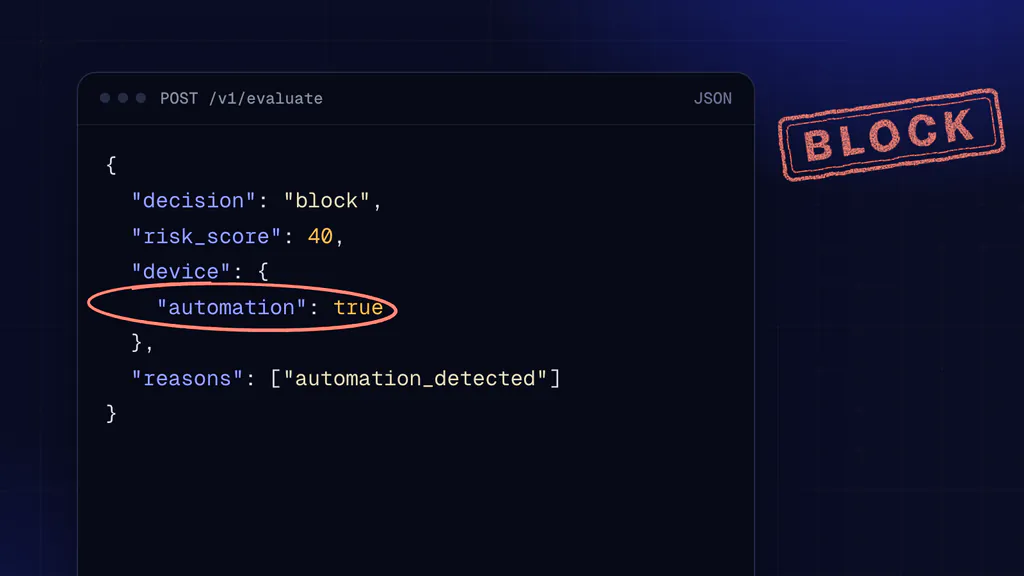
| An automated browser, a fake browser, a proxy or a Tor exit | Block the action | Stops the submission while public pages stay open |
| The check cannot run or gives no answer | Fail open by your policy, log it, keep your other controls | A failed check should not lock out customers |
This is also how Maskbreak answers by default: an automated browser, a fake browser, a proxy or a Tor exit is block; a VPN on its own is review, never a block; a cloud server on its own is allow, with the reason datacenter_asn attached so you can see it. A review pauses the action; it is not an approved sale or account. At payment you might ask for another verification step or hold the attempt for fraud review, and for a contact form you can verify the email address before routing the lead. Why a VPN alone should not be a block is in our post on VPN false positives.
Roll it out without losing customers
Start in watch mode. Record the action, the decision, its reasons and what your existing system did, and let every submission through. Log what you need for troubleshooting without keeping form data you do not need.
Compare decisions with what you know, for a few days. Match real orders and signups against spam and bursts of failed logins. Watch VPN users, shared devices, mobile networks and your own automation, and change a block rule that catches customers.
Enforce one form at a time. Start where the damage is clear. Block strong abuse signals, send unclear visits to review and leave the other forms in watch mode. After each change, watch refused submissions, complaints and completed real actions, and keep a way to roll the rule back.
Keep your other layers. Keep rate limits on noisy paths and firewall rules for scans and crawler floods. A check at the form does not replace patches, strong authentication or payment controls, and a firewall does not replace a decision at the form.
A short Maskbreak example
Try the bot example to see a sample request, its decision and the signals behind it. No API key required.
Maskbreak checks the connection for VPNs, residential and mobile proxies, Tor exits and cloud servers, and the browser for automation and fake browser identities. Each check returns a decision (allow, review or block) and the reasons behind it. Put the script on the page with the form and add class="monocle-enriched" to the form itself; the script adds two hidden fields, monocle and sentinel_fp:
<script async src="https://maskbreak.com/assets/sentinel.js"></script>

<form class="monocle-enriched" method="POST" action="/signup">
  <!-- Your fields stay as they are. -->
</form>
On the server, before you commit the action, send monocle as token and sentinel_fp as fingerprintEventId, with your API key read from the server’s environment. In a Node.js app (Express, with the form body parsed):
let decision = null;
let reasons = [];
try {
  const res = await fetch('https://maskbreak.com/v1/evaluate', {
    method: 'POST',
    signal: AbortSignal.timeout(3000),
    headers: {
      Authorization: `Bearer ${process.env.MASKBREAK_API_KEY}`,
      'Content-Type': 'application/json',
    },
    body: JSON.stringify({ token: req.body.monocle, fingerprintEventId: req.body.sentinel_fp }),
  });
  if (res.ok) {
    const verdict = await res.json();
    if (['allow', 'review', 'block'].includes(verdict?.decision)) {
      decision = verdict.decision;
      reasons = Array.isArray(verdict.reasons) ? verdict.reasons : [];
    }
  }
} catch {
  // A timeout, network error or unreadable response leaves decision null.
}
On WordPress the same call goes through WordPress’s own HTTP client, with the key defined in wp-config.php:
$res = wp_remote_post( 'https://maskbreak.com/v1/evaluate', array(
    'timeout' => 3,
    'headers' => array(
        'Authorization' => 'Bearer ' . MASKBREAK_API_KEY,
        'Content-Type'  => 'application/json',
    ),
    'body'    => wp_json_encode( array(
        'token'              => sanitize_text_field( wp_unslash( $_POST['monocle'] ?? '' ) ),
        'fingerprintEventId' => sanitize_text_field( wp_unslash( $_POST['sentinel_fp'] ?? '' ) ),
    ) ),
) );
$verdict = null;
if ( ! is_wp_error( $res ) && 200 === wp_remote_retrieve_response_code( $res ) ) {
    $verdict = json_decode( wp_remote_retrieve_body( $res ), true );
}
$decision = $verdict['decision'] ?? null;
if ( ! in_array( $decision, array( 'allow', 'review', 'block' ), true ) ) {
    $decision = null;
}
In watch mode, log the decision and its reasons and let every submission through. Once you enforce, let allow go ahead, send review to an extra step such as an email code, and stop block before you commit the action. If the check cannot run (a timeout, a network error, an answer without a decision), follow your fail-open policy and keep your rate limits: an error is not evidence of fraud.
The Free plan includes 10,000 visitor checks a month with no credit card; paid plans start at €29 a month, VAT included. Maskbreak also has an IP reputation API, email and phone checks, SDKs for Node.js, Python and PHP, and a dashboard where every check shows up with its reasons. The homepage runs a live check on your own visit, so you can see an answer before you change anything in production. You still build the review step yourself, and for heavy crawling of public pages you keep a firewall as well. The bot detection page has the details, and pricing has the plans.
Questions people ask
- Will blocking bots hurt my SEO?
- Not if verified search crawlers can still reach your public pages. Search crawlers do not sign up, log in or check out, so a check on those forms does not touch crawling. Blocking crawlers across the whole site, or trusting a user-agent name that anyone can copy, is what causes trouble.
- Should I block all VPN users?
- No. Many real customers use a VPN for privacy or at work. Treat a VPN on its own as a reason for an extra step, such as an email code, and block only when it comes with stronger signals, such as an automated or fake browser.
- Is a CAPTCHA enough to stop bots?
- It stops basic scripts and slows repeated abuse. Solving services and more capable automation get past it, and a hard challenge costs you real customers. Pair it with a decision on your server at the form, or replace it there.
- How do I block bots on WordPress?
- Keep WordPress, themes and plugins updated, rate-limit wp-login.php, disable XML-RPC if nothing uses it, and run the check in the server-side handler of your login, registration, checkout or form plugin, not only in the browser.
- Can I block AI crawlers?
- Yes, as a publishing decision. A robots.txt rule tells crawlers that honour it what you prefer, and a firewall or server rule blocks those that ignore it. Keep that policy apart from form protection: blocking AI crawlers does not stop a script that fills in your signup form.
Put the check where the attack enters
One call before signup, login or checkout returns decision, risk_score and the reasons behind them. The Free plan includes 10,000 visitor checks a month with no card, and setup starts in watch mode, so nothing is blocked until you turn blocking on.