- A mobile proxy is a phone with a SIM card relaying other people’s traffic. The iProxy app costs from $9 a device for 30 days (phone and SIM extra), and sellers rent ready-made ones: the listing we used offered shared or dedicated access, a free trial and crypto payment.
- Carrier-grade NAT can put hundreds or even thousands of real subscribers behind one mobile address, so blocking the IP blocks them too, and the address rotates on demand.
- A 4G/5G proxy sold as running on real Estonian SIM cards, with its exit on Telia’s network, was blocked on its first visit to Maskbreak’s live check: the network signal read Proxy (
proxy_detectedin the API). The browser was clean, so the connection alone decided. - No detector sees every mobile exit: one not yet tied to a proxy pool reads as an ordinary phone connection. Keep the device check and per-device account counters on, and never block the carrier.
On this page
Mobile proxies are sold on real phones, real SIM cards and a “huge pool of clean” carrier addresses, each shared with many ordinary subscribers. On 30 September 2026 I got one as a free one-hour trial over Telegram, a 4G/5G proxy its seller lists as running on real SIM cards, with its exit on Telia’s Estonian network, and opened Maskbreak’s live check through it. First visit: Block, with “Proxy” under network signals. The IP lookup card said the same: proxy detected, residential proxy detected. Here is what a mobile proxy is, why IP reputation fails on it, what caught this one, and where the limits are.
What a mobile proxy is
A mobile proxy is a phone with a SIM card whose mobile data connection relays other people’s traffic. Websites see the carrier’s address, the same kind of address every customer of that carrier gets. Building one takes very little. iProxy, which makes one such app, describes it as a way to “Turn your Android into a mobile proxy server”; its site lists the kit as “1 Android phone + 1 SIM card with fast mobile internet + 1 subscription to iProxy”, with “Changing the IP address by following a link” and “Automatic IP rotation” as core features, from $9 per device for 30 days (iproxy.online, 30 September 2026).
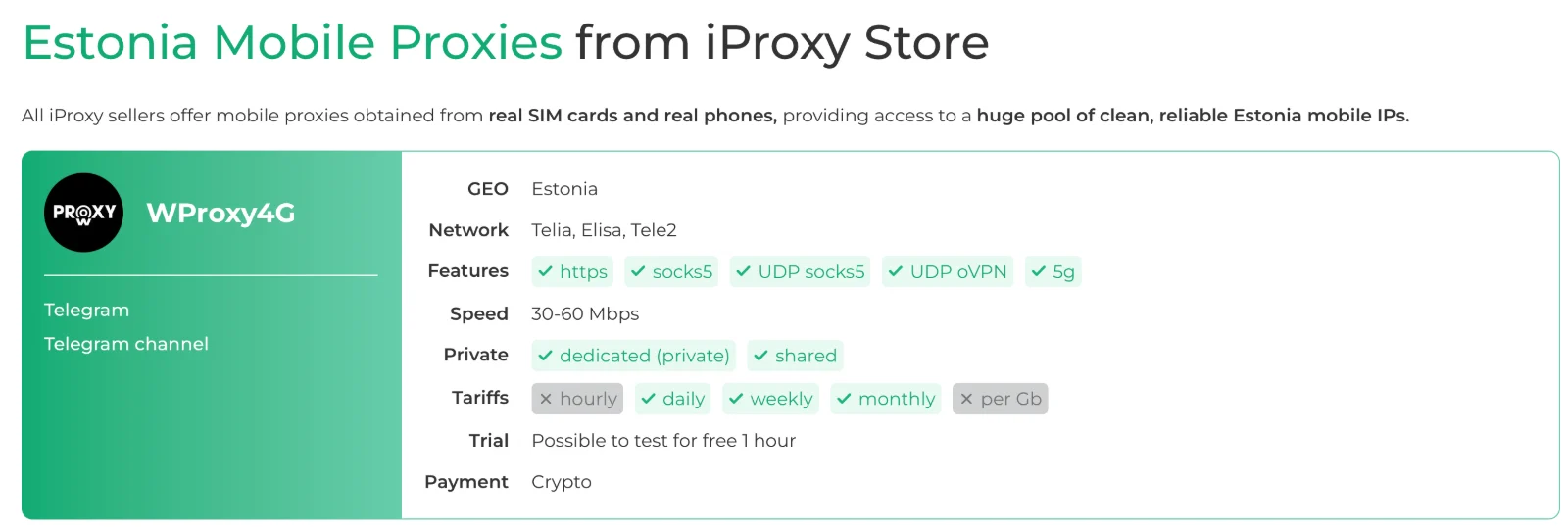
Many buyers never build anything; they rent from a seller. iProxy runs a store where sellers list ready-made proxies by country. The Estonian listing I used offered Telia, Elisa and Tele2 SIMs, HTTPS and SOCKS5, “dedicated (private)” or “shared” access (shared: other buyers use the same phone at the same time), daily, weekly or monthly tariffs, crypto payment and a free one-hour trial.
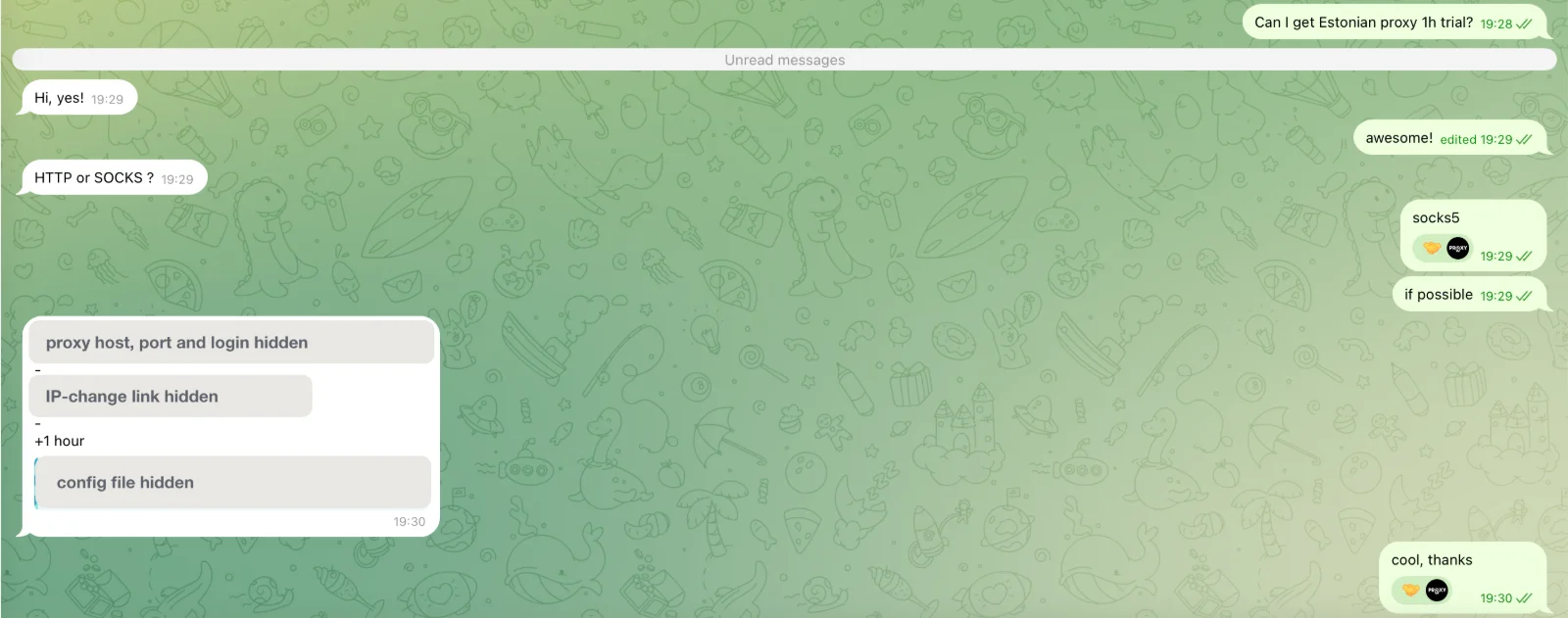
I asked the seller on Telegram at 19:28. At 19:30 I had a SOCKS5 host, a port, a login, a link that changes the IP on demand, and one hour. No payment; the only question was HTTP or SOCKS.
Why IP reputation fails on mobile proxies
Three things make a mobile exit hard to judge by its address.
- The address is shared. Mobile carriers can put many subscribers behind one public IPv4 address with carrier-grade NAT. Cloudflare’s researchers (29 October 2025) put it plainly: “a single IPv4 address may represent hundreds or even thousands of users”, and “Blocking the shared IP therefore penalizes many innocent users along with the abuser.”
- The address moves on demand. One tap on the IP-change link and the phone reconnects with a fresh carrier address. A list of yesterday’s bad addresses describes yesterday.
- The network looks like a phone company, because it is one. The exit belongs to a carrier’s own network, not a hosting company, so a cloud-range list never matches it. Some carriers also run home broadband on the same network (my test exit read as “Telia Eesti”), so the network name alone does not even say “mobile”.
That is why a bare-IP lookup cannot answer the question. Maskbreak’s own GET /v1/lookup checks an address against the Tor exit list and published cloud ranges only, and a mobile exit is neither. The proxy verdict comes from a live visit: POST /v1/evaluate with the token the browser SDK collects on your page.
Put your own browser on the bench: the free scanner on the homepage returns the verdict the API returns, with every reason listed.
Open the scannerWhat Maskbreak saw
I pointed Safari 26 on my Mac at the proxy and opened maskbreak.com. The live check on the homepage runs the same device and network checks as /v1/evaluate. First visit:
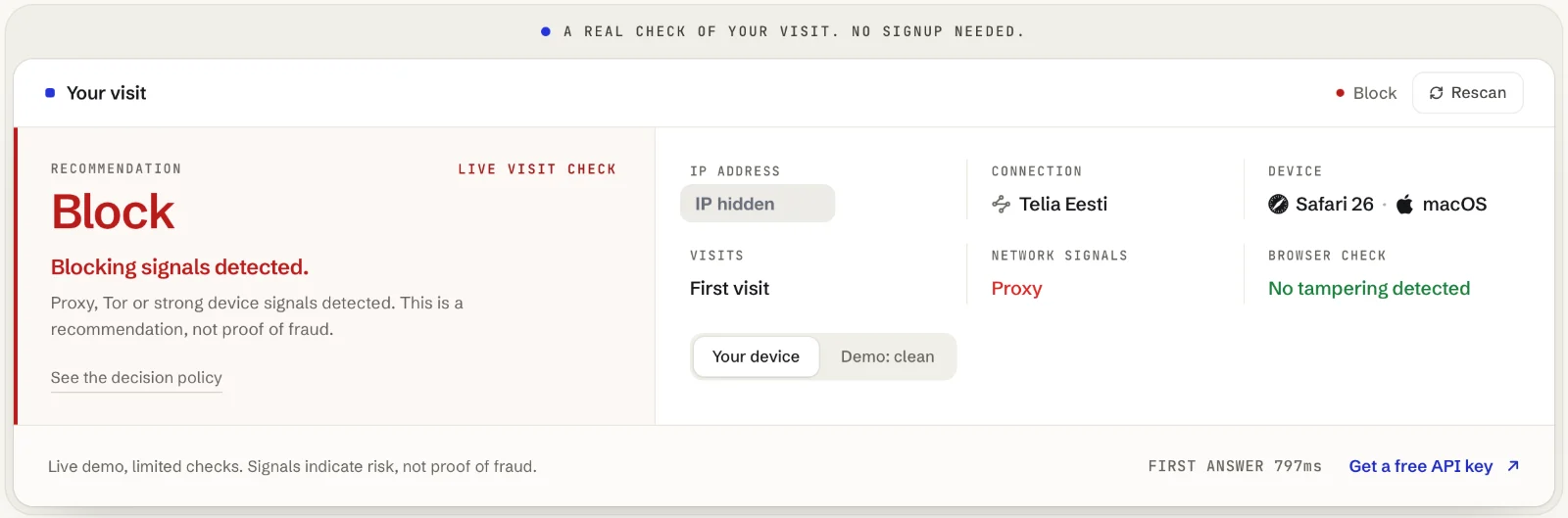
The browser was an ordinary Safari on an ordinary Mac, and the browser check said so: no tampering. The block came from the connection alone. Maskbreak’s network intelligence judged this visit’s connection, not the carrier’s reputation, and flagged it as a proxy on the first visit. It did not name the pool; network.service is filled in only when the service is known. The IP lookup page, opened through the same proxy, showed the same connection as a list:
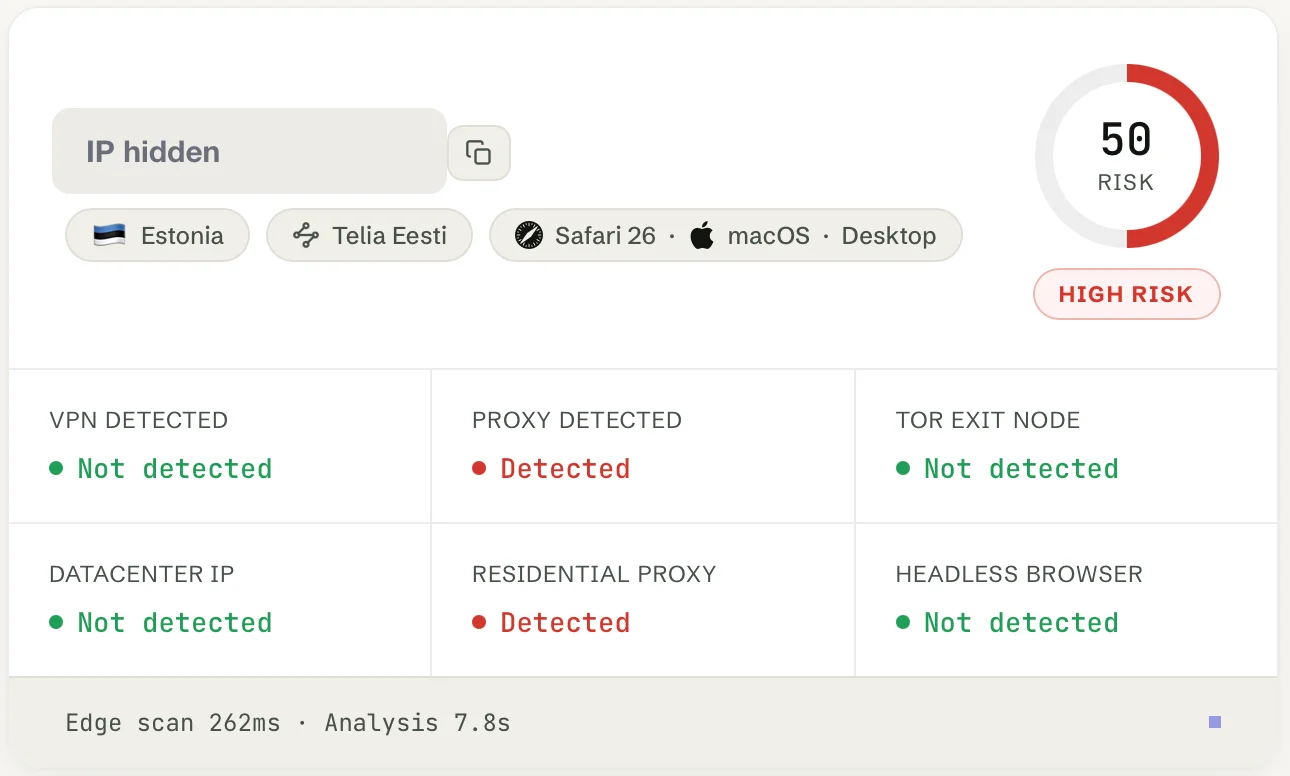
The card’s “Residential proxy” row reads Detected when the proxy flag fired and the cloud-server flag did not, so a proxy exit on a carrier’s mobile network counts. In the API the same visit would read network.proxy: true and network.residential: false, because residential there means only that neither the proxy nor the cloud-server flag fired. Computed with the same code that answers customers:
The limits, stated plainly
This was one proxy, one seller and one evening. The price or the “premium” label of a proxy does not change how the check works, but no detector sees every mobile exit: an exit that has not been tied to a proxy pool yet reads as an ordinary phone connection. In the API that is decision: "allow" with network.residential: true, which means neither the proxy nor the cloud-server flag fired, not that the visitor is safe. That is why the other layers stay on:
- The device. Whoever rents the proxy still has to use a browser. Fake or tampered browsers and automation block by default, whatever the connection; an emulator does too, and a virtual machine asks for review.
- Your own counters. Send your
accountIdwith each check anddevice.linked_accountscounts how many of your accounts one device has touched. A rotating mobile IP resets an IP counter at every rotation; it does not reset the device. - Never block the carrier. Blocking a mobile address or a carrier network blocks everyone behind the same carrier-grade NAT. Block the visit that fired, not the address.
Test your own proxies
If you sell or buy mobile proxies, or you are a fraud team that wants to know what reaches your forms, open maskbreak.com through the proxy and read the live check: decision, connection, device and browser check, no signup needed. Rotate the IP and rescan. For residential proxies in general, read how to detect residential proxies and where ‘clean’ home IPs come from; the proxy detection page has the overview, and the Aurorium test from the same day shows the browser side.
Maskbreak’s Free plan includes 10,000 visitor checks a month with no credit card; paid plans start at €29 a month, and every plan has the device check and the network check. Your server calls /v1/evaluate with the key from MASKBREAK_API_KEY; the quickstart has the handler and the integration guide the watch-then-enforce version.
Questions people ask
- What is a mobile proxy?
- A mobile proxy routes your traffic through a phone with a SIM card, so websites see the mobile carrier’s address instead of yours. Kits such as iProxy turn an Android phone into a proxy server, and sellers rent ready-made ones by country, either shared with other buyers or dedicated, often with an IP change on demand.
- Can mobile proxies be detected?
- Yes, when the network check recognises the proxy, and not by IP reputation. In our test on 30 September 2026, a 4G/5G proxy sold as running on real Estonian SIM cards, with its exit on Telia’s network, was flagged as a proxy on its first visit to Maskbreak’s live check, and the decision was block. A proxy the check does not know yet can read as an ordinary phone connection; the device check and per-device account counters cover that gap.
- Why not just block mobile IP addresses?
- Because they are shared. Mobile carriers use carrier-grade NAT, and Cloudflare’s researchers wrote in October 2025 that a single IPv4 address may represent hundreds or even thousands of users, so blocking it penalises many innocent users along with the abuser. Block the visit that fired, not the address or the carrier.
- What is the difference between a mobile proxy and a residential proxy?
- Both exit through consumer connections rather than cloud servers. A residential proxy uses home broadband lines, sometimes on devices whose owners never agreed; a mobile proxy uses a phone’s SIM data connection on a carrier network, where one address is shared by many subscribers. Maskbreak’s IP lookup card labels both as a residential proxy: the row reads Detected when the proxy flag fired and the cloud-server flag did not.
- Does an expensive or dedicated mobile proxy avoid detection?
- Price is not what decides it. A proxy the network check recognises is flagged whatever it cost; one it does not know yet reads as an ordinary phone connection, shared or dedicated. This test covered one trial proxy from one seller, not dedicated or premium ones, and nobody can honestly promise to catch every exit, which is why the device and account layers stay on.
Run the same check on your traffic
The free scanner on the homepage returns the verdict the API returns: network and device signals in one call, with every reason listed. What each signal means: bot detection and device fingerprinting.