- Layer3 Intel’s test traffic left through the White House network, AS2650, 236 times between 5 October and 3 November 2026: from 6 addresses, on 26 of 30 days, through 28 residential proxy services.
- Neither report claims a breach: Layer3 reads the evening timing as one person’s device running proxy software, and says its data shows the exits, not the device or the person.
- One app, program or browser extension with a proxy kit is enough to rent out a network’s address; Synthient tied what it saw to several Windows 11 installations of Infatica.
- A network owner can inventory software, read DNS logs for proxy-network domains, watch for long-lived outbound connections and treat apps that pay for bandwidth as unapproved software.
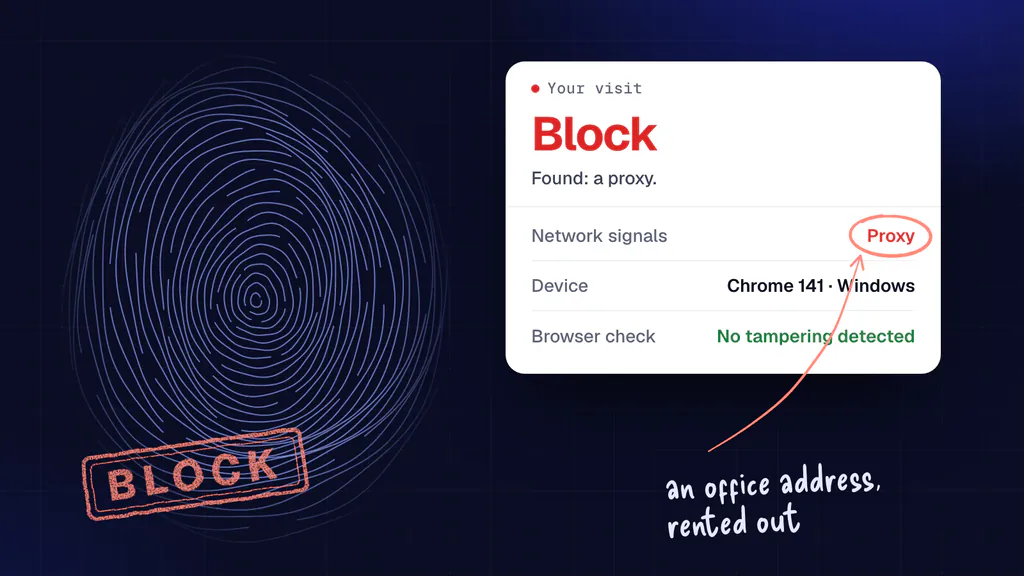
- A website should check each visit, not each address: Maskbreak blocks a visit relayed through an exit tied to a proxy pool (
proxy_detected) whoever owns the address, and an exit nobody has tied to a pool reads clean.
On this page
For a month this autumn, someone renting a residential proxy could have their web traffic leave through the White House network. Layer3 Intel, a company that tracks proxy networks, reported on 4 November 2026 that its test traffic came out through the White House’s own network 236 times in 30 days, and KrebsOnSecurity covered it the same day. Below: what the two reports say and do not say, how one device turns a network into a residential proxy exit, why that matters to the network’s owner and to every website the traffic reaches, and how to look for it from both sides, including what Maskbreak, the fraud detection API this blog belongs to, can and cannot see. The facts were checked on 6 November 2026.
What Layer3 Intel found
Layer3 runs what it calls a residential proxy enumeration pipeline: it buys access to public proxy services and sends requests through them to see where they come out. From 5 October to 3 November 2026 that traffic exited through AS2650 “236 separate times”, from 6 addresses, on 26 of the 30 days, and 28 residential proxy services were able to exit through the network (Layer3 Intel). AS2650 is the network number registered to the Executive Office of the President since May 1993, in the records of the American Registry for Internet Numbers (ARIN); Maskbreak’s ASN lookup shows the address ranges it announces.
Layer3 says it did not go looking for this network. The access is public, bought by “paying a few dollars”, and it caught the exits “by chance” while asking the services for rotating addresses around the world. To rule out a fluke it checked the six addresses against other proxy-detection services and says their public pages, Synthient’s among them, also list them as residential proxy exits. It has kept the raw logs and offers them to the relevant agencies.
The timing led Layer3 to its reading. About half of the exits fell between 5 p.m. and midnight Eastern time and almost none in the early morning, which it says suggests “a person rather than a public guest Wi-Fi network”: someone regularly on the network late into the evening, whose device runs proxy software. It adds a hedge worth keeping: “Our data shows the exits, not the device or the person behind them.” (Layer3 Intel)
Synthient, another proxy-tracking company, said on X that what it saw from the network came from several Windows 11 installations of Infatica, a proxy service that KrebsOnSecurity describes as often built into “free” apps for phones and computers. The White House “did not immediately respond to a request for comment”, KrebsOnSecurity wrote (KrebsOnSecurity).
Is your connection flagged as a proxy?
Open the live check on our homepage from your own connection, or through a proxy you want to test, and see whether the visit reads as a proxy, with no sign-up.
What the reports do not say
Neither report says the network was breached, that anyone reached the systems behind it, or that the traffic which left through it was used for anything illicit. What Layer3 measured is that proxy customers’ requests came out from the network’s addresses. The risk it raises is a possibility: past research has shown that poorly secured proxy kits can open the network behind an exit to the people renting it, and “if an SDK on this network has the same kind of flaw”, a buyer could use it to reach internal systems. Its example is the Kimwolf botnet, which Synthient found had reached at least 2 million devices through residential proxy networks (Layer3 Intel; the background is in residential proxy botnets).
The coverage also differs in places. Layer3 writes of a person; KrebsOnSecurity’s opening says several staffers. Layer3 writes that most of the activity happens in the evening, about half of it between 5 p.m. and midnight; KrebsOnSecurity puts most of it between 5 p.m. and midnight (Layer3 Intel, KrebsOnSecurity). KrebsOnSecurity’s opening also ties one of the services to Russia, through background on Infatica’s founder: a hosting company of his, it reports, was home to most of the addresses used in 2016 attacks on election systems in Arizona and Illinois. That is background about a company founder, not a finding about this network, and neither source says Infatica took part in anything illicit here.
How one device turns a network into a residential proxy exit
A residential proxy service sells its customers the use of ordinary connections, so that their requests reach websites from someone else’s network instead of a cloud server: in Layer3’s words, it sells access to everyday devices so that the traffic “appears to come from that device's network” (Layer3 Intel). Despite the name, the connection does not have to be a home one. Any device that runs the service’s software becomes an exit, wherever it is plugged in, and an office network is no exception.
The software usually arrives inside something else. App developers embed the proxy networks’ software development kits to earn a small amount on each installation, and these services are often found on employees’ devices brought into the workplace, KrebsOnSecurity explains (KrebsOnSecurity). Once installed, the kit keeps a connection open to the proxy network and relays the requests its customers send. On a network where many devices share a few public addresses, as most office and home networks do, those requests leave with the network’s own address: the one websites also see for everyone else on it. How the kits work and how their makers are paid is in proxy SDKs and proxyware; the same question for a phone at home is answered in is my phone being used as a proxy.
It is cheap to buy and common to find. Synthient’s founder told KrebsOnSecurity that some resellers sell bandwidth for as little as 60 cents a gigabyte; Infoblox reported that 65% of its customers were querying one or more residential-proxy domains, and another proxy-tracking service reported residential proxies in nearly 300 government-run networks in a January 2026 webinar (all as KrebsOnSecurity reports). Layer3’s own observatory found exits in some of the most remote places on earth, 413 addresses on Saint Helena, Ascension and Tristan da Cunha among them (Layer3 Intel).
Why it matters to the network’s owner
- Strangers’ traffic carries your address. Whatever the proxy’s customers do, websites log it under the network’s address. That can get the address challenged or blocked for everyone behind it (an “unusual traffic” page is often the first sign), and it puts the network’s name on requests its own people never sent.
- The exit can be a way in. A kit that fetches whatever its customers ask for can, if it is badly built, fetch addresses inside the network too. KrebsOnSecurity recalls that in January 2026 dozens of proxy services had to patch their networks after Synthient showed criminals abusing such a flaw to take control of devices on users’ local networks (KrebsOnSecurity). Whether any kit on this network had such a flaw, neither report says.
- It means software nobody approved. A proxy kit on a work device is software that sends and receives traffic for strangers, installed with an app someone wanted for something else.
Why it matters to every website that sees the traffic
From a website’s side, a request through an exit appears to come from the exit’s address, not from the proxy service’s customer; that is the product being sold. A visit relayed through an office, a government network or a home arrives from an address with a good name: not a cloud server, not a Tor exit, often on no blocklist. KrebsOnSecurity lists what residential proxies are used for: account takeover and other cybercrime, advertising fraud and mass scraping of content for AI projects (KrebsOnSecurity). At a signup form or a login page that means fake accounts and password guessing from addresses that look like real customers’ (see credential stuffing through residential proxies).
How a network owner can look for it
Neither report gives advice to network owners; the steps below are ours, written for any office, school or public body, not as a description of the White House’s systems.
- Inventory the software. List the apps, desktop programs and browser extensions on every device that joins the network, personal ones included where your policy reaches. Free VPNs, “passive income” apps and apps that pay for unused bandwidth are the usual carriers.
- Read the DNS logs. A proxy kit usually looks up its network’s servers by name before it connects. Compare the names your devices resolve against threat-intelligence lists of proxy-network and proxy-SDK domains; Infoblox’s finding above says how often such lookups turn up.
- Watch outbound connections. A kit keeps a connection open to the proxy network’s control servers and receives its work through it, even while its device sits idle. Long-lived outbound connections from laptops and phones to hosts nobody recognises, and traffic that does not match what the device’s user did, are the things to chase.
- Treat bandwidth-paying apps as unapproved software. Put “free” apps that pay for your connection, and apps known to carry proxy kits, on the list your device management blocks, and say so in the acceptable use policy.
- Keep personal and guest devices apart from internal systems. If a kit is badly built, a separate network limits what its customers could reach.
- Check your own addresses. Look up your public addresses on proxy-intelligence services’ public pages, as Layer3 did with Synthient’s, and open the live check on Maskbreak’s homepage or the VPN checker from a device on the network. A clean result means that check did not flag that visit at that moment, not that nothing on the network is rented out.
How a website can tell: check the visit, not the address
An address can carry a proxy customer’s request one minute and its own people’s the next. A lookup of the address can only say what is known about it; the visit in front of you carries the evidence of how it got there. That is how Maskbreak works: POST /v1/evaluate reads the visit’s own network check (a token from the script on your page) beside a check of the browser, and returns allow, review or block with the reasons. When the network check ties the visit’s route to a known proxy pool, the answer is a proxy, with the service named when it is known, whoever the address belongs to: a home, an office or a government network.
Computed with Maskbreak’s own response builder, for a documentation address. network.residential reads false because the proxy flag fired: it describes the reading, not who owns the address. service is null here because no pool is named; a real answer names it when it is known. The same check on other visits from an address like these, under the default policy with no customer rules:
| The visit | decision | risk_score | reasons |
|---|---|---|---|
| Relayed through an exit the network check ties to a proxy pool | block | 50 | proxy_detected |
| The same, with a script driving the browser | block | 90 | proxy_detected, automation_detected |
| Relayed through an exit nobody has tied to a pool yet | allow | 0 | none |
| The same untied exit, with a script driving the browser | block | 40 | automation_detected |
Read the table for its limits. An exit nobody has tied to a pool yet reads clean on the network side, the same as a visit sent straight from that network, which is why the browser check matters: a script driving the browser still blocks, wherever it connects from. A VPN is treated differently: a VPN on its own is sent to review, not blocked. No detector sees every exit, and the pools keep adding new devices. We have not seen the traffic that went through these six addresses, so we cannot say what Maskbreak would have answered for it.
Two more things a website should know. A lookup of a typed-in address cannot answer this question: Maskbreak’s GET /v1/lookup and its address pages check only the Tor exit list and published cloud ranges, so they cannot tell you that an address like these six is a proxy exit; only a check on a live visit can see the relay. And an address that was an exit last month also carries its own people, so a list of past exits punishes them for one device: decide on each visit, not on the address’s history. To see what your own connection reads as, open the live check; the proxy detection page describes the same check for your own forms.
Questions people ask
- What did Layer3 Intel find on the White House network?
- Layer3 Intel reported on 4 November 2026 that from 5 October to 3 November its proxy test traffic left through AS2650, the network registered to the Executive Office of the President, 236 times: from 6 addresses, on 26 of the 30 days, through 28 residential proxy services. It found this by chance, through public proxy services anyone can buy.
- Was the White House network breached?
- Neither Layer3 Intel nor KrebsOnSecurity says so. Layer3 reports exits, the points where proxy customers’ traffic left the network, and says its data shows the exits, not the device or the person behind them. It notes that a badly built proxy kit could let a proxy buyer reach internal systems, as a possibility, not a finding.
- What is a residential proxy exit?
- A device on an ordinary home, mobile or office connection that relays other people’s web traffic for a proxy service, usually because an app, program or browser extension on it carries the service’s software kit. Websites see those requests arrive from that network’s address, not from the proxy service’s customer.
- How does a network end up as a residential proxy exit?
- One device on it is enough. App developers embed proxy networks’ software kits to earn a small amount per installation, so a kit can arrive inside a free app, a desktop program or a browser extension. Once installed, it keeps a connection open to the proxy network and relays its customers’ requests out through the network’s own public address.
- How can I check whether my organisation’s network is a proxy exit?
- Inventory the apps, programs and browser extensions on devices that join the network; look in DNS logs for lookups of proxy-network and proxy-SDK domains; watch for long-lived outbound connections from laptops and phones to hosts nobody recognises; and block apps that pay for unused bandwidth. Then look up your public addresses on proxy-intelligence services and run a live check from a device on the network.
- Can a website detect traffic coming through a residential proxy exit?
- Often, by checking the visit rather than the address. Maskbreak’s evaluate API reads the visit’s own network check and answers block with the reason proxy_detected when it ties the route to a known proxy pool, even when the address belongs to a home or an office. An exit nobody has tied to a pool yet reads clean, which is why a check of the browser for automation matters too, and no detector sees every exit.
- Can an IP lookup tell me whether an address is a residential proxy exit?
- Not Maskbreak’s: a lookup of a typed-in address checks only the Tor exit list and published cloud ranges, so it cannot say that an address like the six on the White House network is a proxy exit. The live check on Maskbreak’s homepage runs on your own visit and shows whether your connection reads as a proxy.
Catch proxies at your signup
One call from your server returns allow, review or block for each visit, with the proxy service named when it’s known and every reason listed. The Free plan includes 10,000 visitor checks a month with no card, and setup starts in watch mode, so nothing is blocked until you turn blocking on.