- Datacenter IP detection matches an address against the ranges clouds publish, the network that announces it, or, on a live visit, Maskbreak’s network intelligence.
- A cloud-server address is context, not evidence of fraud: VPN exits, crawlers, CI runners and company gateways can come from cloud space too.
- On a live visit a cloud-server address alone is allow with
datacenter_asnand a risk score of 15; beside a VPN it is review, beside a proxy, an automated browser or a fake browser it is block. - A bare IP lookup checks only the Tor exit list and published cloud ranges, so a cloud-range hit reads review at 40: there is no visit to weigh it against.
- No cloud range file lists a residential or mobile proxy’s address; catching one takes the live visit’s network reading, which flags exits tied to a known proxy pool, and the device check.
On this page
Datacenter IP detection answers one question: does an address belong to a hosting or cloud company rather than to a home or mobile connection? Maskbreak calls such an address a cloud-server address. A match names the company whose network the address belongs to, not who is using it: a signup from a cloud address can be a script, a VPN user or an employee behind a company gateway. The outside facts below were checked on 30 September 2026.
Three ways to tell whether an address is a cloud server
1. The provider’s own range file. The large clouds publish the address blocks they operate as machine-readable files. A match is authoritative for one fact: the provider counts the address as its own. It says nothing about who rented it, or why.
| Provider and file | What the provider says it lists | How it changes | On 30 Sep 2026 |
|---|---|---|---|
| AWS, ip-ranges.json | Its “current IP address ranges”, each with a region and a service such as EC2 or S3; only services customers commonly filter on, and not addresses customers bring to AWS (AWS) | A publication time in the file; change notifications you can subscribe to | 7,806 IPv4 and 3,451 IPv6 prefixes, file created that day |
| Google Cloud, cloud.json | A JSON list of “customer-usable global and regional external IP address ranges” (Compute Engine FAQ) | A creation time in the file | 1,103 prefixes (1,008 IPv4, 95 IPv6), file created that day |
| Microsoft Azure, service tags file | Prefixes per Azure service; its AzureCloud tag is described as “All datacenter public IP addresses” (Microsoft Learn) | Lists “updated and published weekly”; new addresses are not used for at least a week | 61,065 distinct prefixes (44,164 IPv4, 16,901 IPv6), file published 29 Sep |
| Oracle Cloud, public_ip_ranges.json | “Public IP address ranges for VCNs and the Oracle Services Network”, tagged OCI, OSN or OBJECT_STORAGE (Oracle) | Poll as often as every 24 hours, and at least weekly | 1,107 IPv4 blocks in 56 regions, last updated 25 Aug |
Two cautions come with the files. Each covers only the provider that publishes it, and only what that provider chooses to list. And the right file matters: Google keeps Google Cloud’s customer ranges in cloud.json, keeps “the general list of Google IP addresses” in goog.json, and publishes separate files for its crawlers (Google Search Central). A check built on goog.json would flag Google itself.
2. The network that announces it. A public address is announced to the internet by an autonomous system, which RFC 1930 defines as a connected group of IP prefixes run by one or more network operators under a single, clearly defined routing policy. A routing-table dump maps each announced address to its AS number and the name its operator registered, so it also covers hosting companies that publish no file. But the name is a label, not a classification: AMAZON-02 says who routes an address, not what it is used for. Maskbreak shows the AS on a bare lookup for display only and never scores it.
3. Network intelligence on a live visit. On a real visit, measured by the browser SDK on your page, Maskbreak’s network intelligence classifies the connection and sets the cloud-server flag itself. The published ranges of nine providers, the four above plus DigitalOcean, Linode/Akamai, Vultr, Cloudflare and Fastly, are refreshed daily and can add the flag, never remove it; the hosting and cloud ranges page lists them.
A cloud-server address is context, not a verdict
Scripts run on cloud servers because servers are cheap to rent. Plenty of people and services you want to keep reach you from them too.
VPN exits. A VPN exit is a server too. Mullvad’s public server list names a hosting provider for each server (DataPacket, Tzulo and M247 were the most common on 30 September 2026) and marks 433 of its 553 WireGuard servers as rented. None of Mullvad’s hosting providers is among the nine whose range files Maskbreak reads (no server address fell inside those files that day), so for its exits the cloud-server flag rests on Maskbreak’s network intelligence alone. When it fires on a VPN exit, Maskbreak lists both reasons, vpn_detected and datacenter_asn, and a VPN alone is review under the base policy, not a block.
Search engine crawlers. Google asks site owners to verify its crawlers by reverse DNS or against the IP lists it publishes. Those lists overlap cloud space: on 30 September 2026, 23 of the 170 IPv4 blocks in its common-crawlers file (Googlebot and similar) sat inside ranges that cloud.json lists as customer-usable Google Cloud space. A range check built on cloud.json, Maskbreak’s included, reads those crawler addresses as cloud servers.
Build and test systems. GitHub says its Windows and Ubuntu hosted runners “are hosted in Azure and subsequently have the same IP address ranges as the Azure datacenters”, and does not recommend using those addresses as allowlists for internal resources (GitHub Docs). A test suite on those runners that signs up to your staging site arrives from Azure.
Company gateways. Companies that route staff browsing through a cloud security gateway send it out from the gateway’s addresses. Cloudflare’s documentation says that by default “traffic that exits through Cloudflare Gateway shares a source IP address with all other Cloudflare One Client users” (Cloudflare Docs).
Block on the cloud-server flag alone and you turn them away along with the scripts. The flag is worth reading next to the device check, not instead of it.
Wire it into your own app: a free key returns decision, risk_score and reasons for every visit, 10,000 checks a month on the Free plan, no card.
Get an API keyWhat a range list cannot see
Range lists also miss in the other direction. A residential or mobile proxy leaves through someone’s home line or a phone’s SIM card: no cloud file lists the address, and an ordinary ISP or carrier announces it, so neither the range files nor the network name points to a cloud. What can catch these visits is the live visit’s network reading, which returns proxy_detected and a block for an exit already tied to a known proxy pool, naming the pool when known, and the device check, which judges the browser itself and can flag an automated or fake browser whatever the address, though not always: the fake-browser flag stayed false for a default Aurorium profile on 30 September (the Aurorium test).
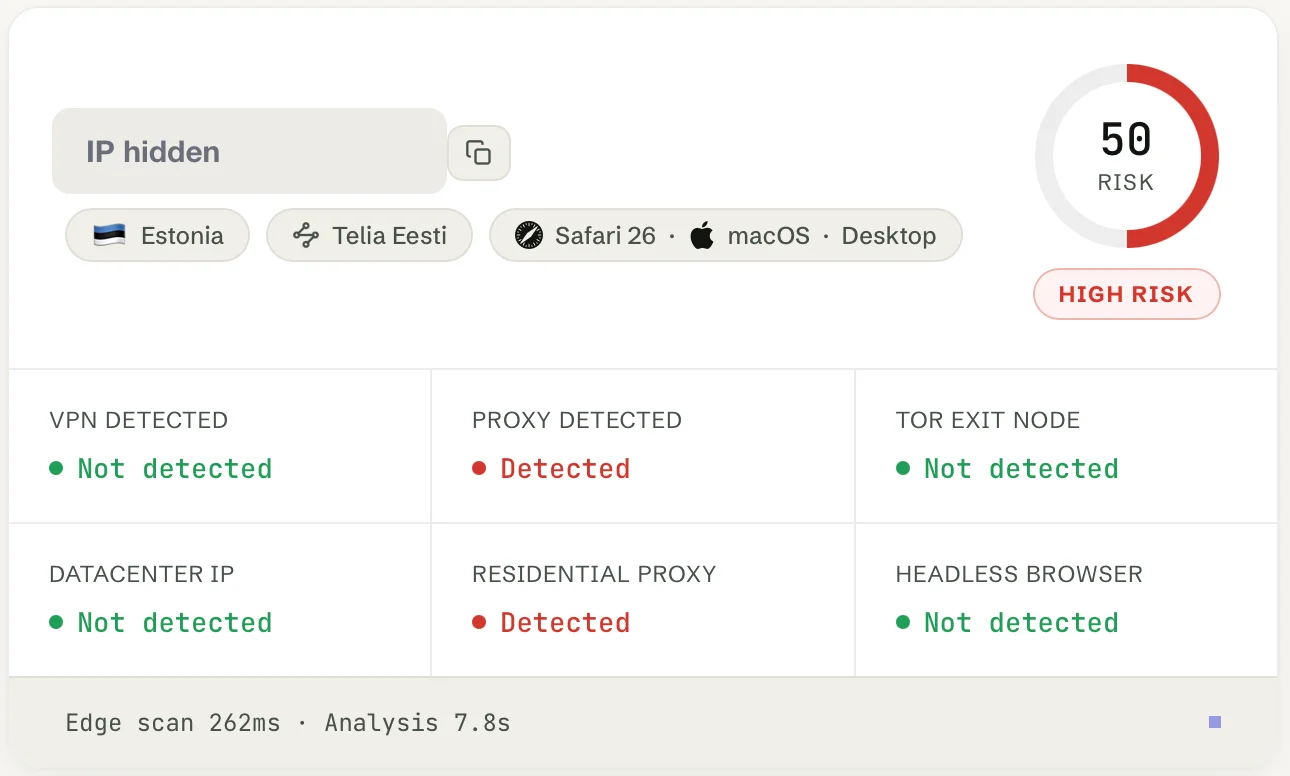
network.proxy: true and network.residential: false. IP hidden. The full test is in mobile proxy detection.An exit nobody has tied to a pool yet reads network.residential: true, which means only that neither the cloud-server flag nor the proxy flag fired, not that the visit is clean. Residential vs datacenter proxies compares the two kinds of proxy, and how to detect residential proxies covers the tells that survive rotation.
How Maskbreak scores a cloud-server address
Maskbreak answers on two surfaces with different evidence, so one address can get two different answers.
On a live visit: allow on its own
POST /v1/evaluate, called from your server with the token the browser SDK collects, returns the flag as network.datacenter: true and the reason datacenter_asn. On its own the flag does not make the visit a threat: the decision is allow and the risk score is capped at 15.
Computed with Maskbreak’s response builder for a documentation-range address; legacy fields, evaluated_in_ms, the evidence fields and the device result are omitted. service, a provider name when known, is null here, and residential is false because the cloud-server flag fired. The public sandbox answers the test token test_datacenter with the same decision, score and reason, no account needed; its fixture also names the provider, "service": "AWS".
Next to a VPN, a proxy, Tor or a device threat (an automated or fake browser, an emulator, a virtual machine), the 15-point cap lifts, the flag’s 30 points count toward the score and the other signal sets the decision. Softer device flags such as private_browsing leave the visit at allow and 15; a disposable email address moves an allow to review:
| The visit | decision | risk_score | reasons |
|---|---|---|---|
| Cloud-server address, nothing else | allow | 15 | datacenter_asn |
| … and a disposable email address | review | 30 | datacenter_asn, disposable_email |
| … and the address is a VPN exit | review | 65 | vpn_detected, datacenter_asn |
| … and the address is a known proxy | block | 80 | proxy_detected, datacenter_asn |
| … and the device check finds an automated browser | block | 70 | datacenter_asn, automation_detected |
| … and the device check finds a tampered or fake browser | block | 65 | datacenter_asn, antidetect_browser |
The email row sends the optional email field, which is checked against a disposable-domain list and not stored. Device rows are computed with that one flag; a real device event can carry more flags or a tampering score that add points. One check stays quiet on purpose: when you send the visitor’s time zone, Maskbreak does not raise timezone_mismatch against a cloud-server address, because such an exit is expected to disagree with the device clock (timezone.checked reads false).
On a bare IP lookup: review at 40
GET /v1/lookup/{ip} and an address you type into the free IP lookup have only the address; the page’s check of your own connection, pictured above, is a live visit. In production a bare lookup checks the Tor exit list and published cloud ranges, nothing else, so a cloud-range hit is the whole of the evidence and reads review at 40: look closer, not block. The range check covers only the nine providers named above: a server at any other hosting company, such as a Mullvad server, reads known: false and allow unless it is a Tor exit. This address sits in a block AWS lists for EC2 in eu-central-1:
curl -s https://maskbreak.com/v1/lookup/18.192.1.10 \
-H "Authorization: Bearer $MASKBREAK_API_KEY"Computed with Maskbreak’s lookup code against AWS’s file and the routing table as of 30 September 2026. known: true means a list matched. country stays null because a bare lookup places nobody, and registration_country is where AS16509 is registered, not where the server or a visitor is. dch and proxied are legacy spellings kept for existing parsers. VPN and proxy verdicts, with the service named when known, need a live visit; proxy detection API vs IP lookup covers when each fits.
Changing the default
If no part of your product expects cloud-server visitors, the Rules tab’s Datacenter server rule can raise them to review account-wide (rules apply per account, not per endpoint); the answer then keeps engine_decision: "allow" and adds rule_matched: ["datacenter"]. A rule speaks only for the signal it names, so it never lowers a block that a proxy or an automated browser caused. To hold them at signup only, branch on datacenter_asn in your own code, as the sample below does.
A policy per surface
Decide per endpoint, not per provider:
- Signup, login and checkout. Read
datacenter_asntogether with the device check. A cloud-server address with a real browser behind it may be a VPN user or an employee on a company gateway; a request with no browser evidence may be a script that skipped the browser. Hold the second for a step you can verify. - Free credit and trials. Where a new account earns something, a cloud-server address alone is a fair reason to ask for that step too.
- Your API. Expect cloud addresses there, because server-to-server calls come from them. Authenticate and rate-limit by key.
- Crawlers and exceptions. Verify crawlers against their operators’ lists, and pin exceptions to one visitor or one address, never to a provider’s ranges.
The server side of a signup check, with the browser SDK’s monocle and sentinel_fp fields on your form (the integration guide has the full watch-then-enforce version):
// Enforce path. Start in watch mode (log v.decision and v.reasons,
// always call next()) for a few days, then switch.
app.post('/signup', async (req, res, next) => {
  try {
    const r = await fetch('https://maskbreak.com/v1/evaluate', {
      method: 'POST',
      signal: AbortSignal.timeout(3000),
      headers: {
        'Authorization': 'Bearer ' + process.env.MASKBREAK_API_KEY,
        'Content-Type': 'application/json'
      },
      body: JSON.stringify({
        token: req.body.monocle,                  // the live visit, not a bare IP
        fingerprintEventId: req.body.sentinel_fp, // the device check
        email: req.body.email                     // checked, not stored
      })
    });
    if (!r.ok) throw new Error('Visitor check unavailable');
    const v = await r.json();
    if (v.test || v.sandbox || v.sample) throw new Error('No production verdict');
    if (v.decision === 'block') {
      return res.status(403).json({ error: 'Signup unavailable.' });
    }
    const onCloud = v.reasons.includes('datacenter_asn');
    // grantsTrialCredit: your own rule for signups that earn something
    if (v.decision === 'review' || v.degraded || !v.device ||
        (onCloud && grantsTrialCredit(req))) {
      return res.status(409).json({ next: 'verify_email' }); // a step you can verify
    }
    return next();
  } catch {
    return res.status(503).json({ error: 'Please try again shortly.' });
  }
}, existingSignupHandler); // your signup handler runs after the gate
Maskbreak’s Free plan includes 10,000 visitor checks a month with no credit card required, and authenticated IP lookups have their own allowance of ten times the plan’s checks; paid plans start at €29 a month (pricing). To check one address now, use the free IP lookup; VPN detection and proxy detection describe what a live visit adds.
Questions people ask
- How do I check whether an IP address is a datacenter IP?
- Match it against the IP ranges the cloud providers publish (AWS ip-ranges.json, Google Cloud cloud.json, the Azure service tags file and Oracle’s public_ip_ranges.json) and look up the network that announces it in the routing table. Maskbreak’s free IP lookup and its GET /v1/lookup endpoint run that range check for the nine providers whose files Maskbreak reads, together with the Tor exit list; a server at a hosting company outside those nine is not flagged as a cloud server there. A match means the provider counts the address as its own, not that the visitor is a fraudster.
- Is a datacenter IP a sign of fraud?
- Not on its own. VPN exits, search engine crawlers, CI runners and company security gateways can send traffic from cloud-server addresses, and so do scripts. Maskbreak answers a live visit from a cloud-server address with nothing else flagged as allow, lists datacenter_asn in reasons and caps the risk score at 15; it blocks when a proxy, Tor, an automated browser or a tampered browser is detected as well.
- Can datacenter IP detection catch residential proxies?
- No. A residential or mobile proxy exits through a home or mobile connection, which is in no cloud provider’s range file. On a live visit Maskbreak flags such an exit as proxy_detected, a block, when its network intelligence has tied it to a known proxy pool, naming the pool when known, and the device check can flag an automated or fake browser whatever the address. A proxy on a cloud server, which sellers call a datacenter proxy, is blocked with both proxy_detected and datacenter_asn when Maskbreak’s network intelligence recognises it as a proxy. One it has not recognised is allowed, with at most datacenter_asn and a risk score of 15, unless another check such as the device check changes the decision.
- Why does looking up a cloud address in Maskbreak’s IP lookup say review when a live visit says allow?
- A bare lookup has only the address. In production it checks the Tor exit list and published cloud ranges, so a cloud-range hit is the only evidence and reads review with a risk score of 40, meaning look closer. A live visit through POST /v1/evaluate carries Maskbreak’s network reading and the device check, so a cloud-server address with nothing else flagged is allowed.
- Should I block all datacenter IPs?
- Not by default. On signup, login and checkout, read the cloud-server reason together with the device check and ask for a step you can verify when there is no browser evidence; expect cloud addresses on API endpoints; verify crawlers against the lists their operators publish. If no part of your product expects cloud-server visitors, Maskbreak’s Rules tab can raise them to review across your account without lowering a block another signal caused; rules apply per account, not per endpoint, so to hold them at signup only, branch on datacenter_asn in your own code.
Paste it in, then watch the verdicts
The public sk_test_sandbox key returns the documented allow, review and block shapes with no account, so the failure path is testable before you go live. SDKs for Node, Python and PHP, or plain HTTP. The API reference and the Free plan cover the rest.