- Discount limits such as first-time order and one per customer count customer records and email addresses; a new account and a new address satisfy both.
- Count accounts per device, not per address: send your own
accountIdand readdevice.linked_accounts, the number of your accounts seen on that device in the last 90 days. The reasonmulti_account_deviceleaves the decision alone; act on the count with a Rules-tab rule or with your own limit at redemption. - A proxy tied to a known pool, automation and a fake browser block by default; a burner inbox, a time zone mismatch, a virtual machine and a VPN alone go to review.
- Check at signup to turn away scripted and fake-browser accounts, and again at redemption, where the discount is paid; refuse the discount, not the order.
- Start in watch mode, compare the log with the console’s Events, then enforce. Do not block VPN users or trust IP counts alone.
On this page
Promo code abuse, also called coupon abuse, is one person collecting a discount meant for many: a first-order code taken again from a new account, a single-use code guessed by a script, or referral credit claimed by one person posing as two. This Maskbreak playbook covers e-commerce and SaaS promo codes: how coupon farms get past the limits a discount carries, what a live visit still shows about them, and which check belongs at signup and which at redemption. The example verdicts are computed with Maskbreak’s own response builder; the outside sources were checked on 2026-09-30.
How promo code abuse gets past a discount’s own limits
Discount tools limit a code by customer record or by contact detail. Stripe’s first-time-order restriction admits customers “who have no prior transaction history on your platform” (Stripe Docs), and Shopify’s “Limit to one per customer” works “by tracking a customer’s email address or phone number” (Shopify Help Center). A coupon farm meets both with a new record and a new address per code:
- A new account per code. A new account has no transaction history, so it is a first-time customer by definition. OWASP lists the bulk version as OAT-019 Account Creation: “Bulk account creation … by using the application’s account sign-up processes” (OWASP).
- A new address per account. A burner domain takes the confirmation mail and is thrown away. A real inbox stretches too: Gmail ignores dots, so john.smith@gmail.com and johnsmith@gmail.com reach the same inbox (Gmail Help), and a plus sign and any word before the @ give it another address (Google Workspace Learning Center). To a limit keyed on the address as typed, each variant is a new customer.
- A new IP address. A VPN or a residential proxy can put each signup on another address, and a per-IP limit then never fills. Counting addresses also fails the other way: where one public IPv4 address is shared between several subscribers, “the IPv4 address no longer uniquely identifies a subscriber” (RFC 6269).
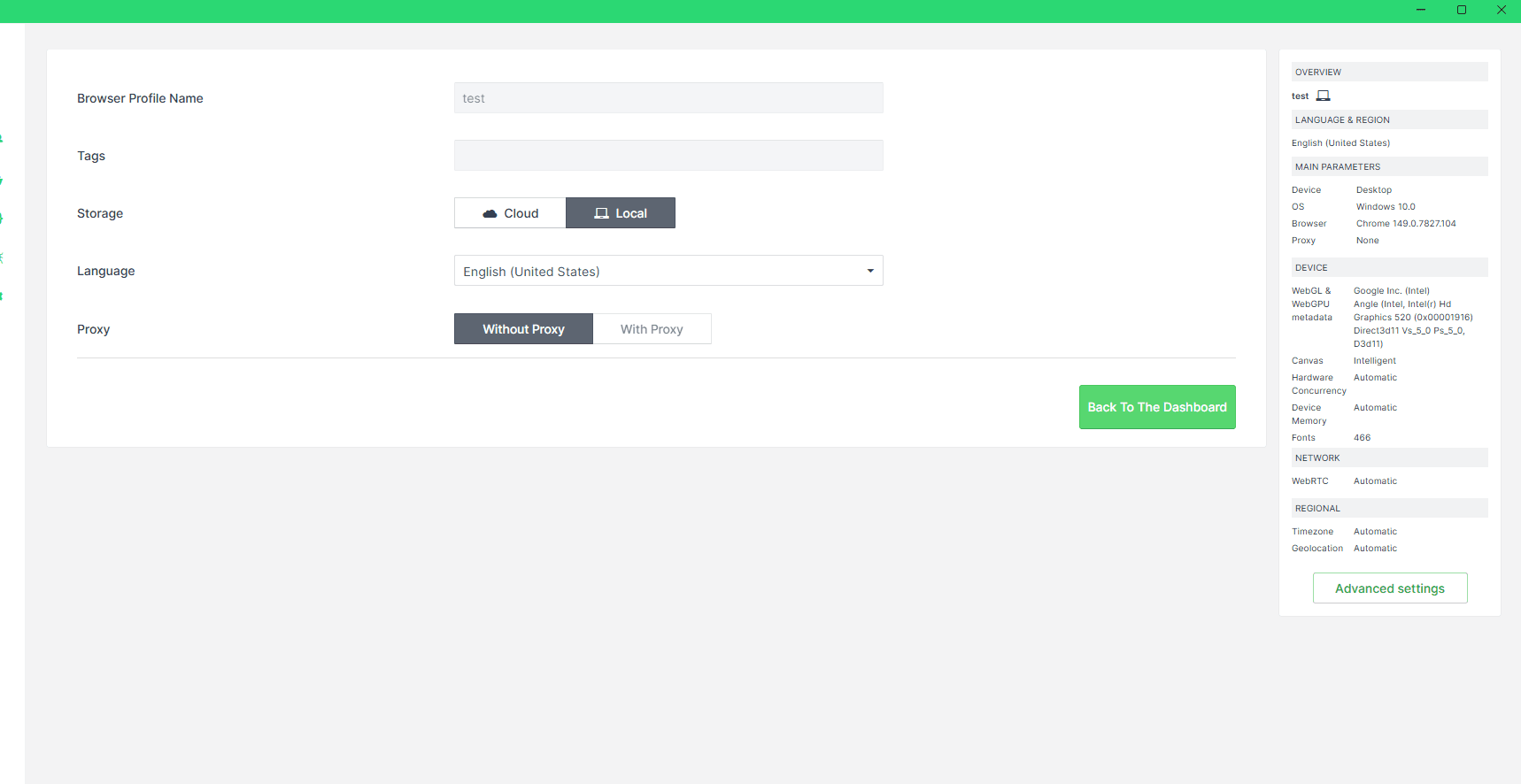
- A new device, or the same one. A casual abuser reuses one laptop, the easiest thing to count. A farm opens a fake browser profile per account: Multilogin’s pricing page offers five “browser profiles with unique fingerprints” free, and 50 for $29 a month billed monthly (Multilogin pricing).
- A script. Scripts create the accounts and try codes; OWASP’s OAT-002 Token Cracking covers “Mass enumeration of coupon numbers, voucher codes, discount tokens, etc.”, also known as coupon guessing (OWASP). Scripts also race a one-time discount: PortSwigger’s example of a limit-overrun race is a store that checks you have not used a promotional code yet, applies the discount and only then records that you used it, which “introduces a small race window during which you can repeatedly claim the discount” (PortSwigger). Your database fixes that one: record the use in the same statement that checks it.
Coupon abuse detection: what the visit still shows
Most of these tools get past one limit and can leave a trace elsewhere, which a live visit check reads: POST /v1/evaluate with the token the browser SDK collects on your page. Device rows need fingerprintEventId; the account count also needs your accountId.
| Farm tool | What it gets past | What the response shows | Default decision |
|---|---|---|---|
| Same laptop, new account | First-order and one-per-customer limits | device.linked_accounts, device.multi_account, reason multi_account_device | Unchanged until a Rules-tab rule sets it |
| Fake browser profile | Device counts | device.antidetect, reason antidetect_browser | Block |
| Browser read as a virtual machine | Device counts | device.virtual_machine, reason virtual_machine | Review |
| Browser driven by a script (signups, code guessing) | Form rate limits | device.automation, reason automation_detected | Block |
| Proxy tied to a known pool | Per-IP limits | network.proxy, reason proxy_detected, the pool named when known | Block |
| VPN | Per-IP and country rules | network.vpn, reason vpn_detected, the service named when known | Review |
| Burner inbox | Email confirmation | email.disposable, reason disposable_email | Review |
| Home-looking proxy exit in a different country from the device clock | Country rules | timezone.matches_ip: false, reason timezone_mismatch (send tz) | Review |
| Dotted or plus-tagged Gmail | Deduplication on the address | Nothing: a real mailbox, email.disposable stays false | Allow; normalise the address yourself |
The proxy row on a real visit:
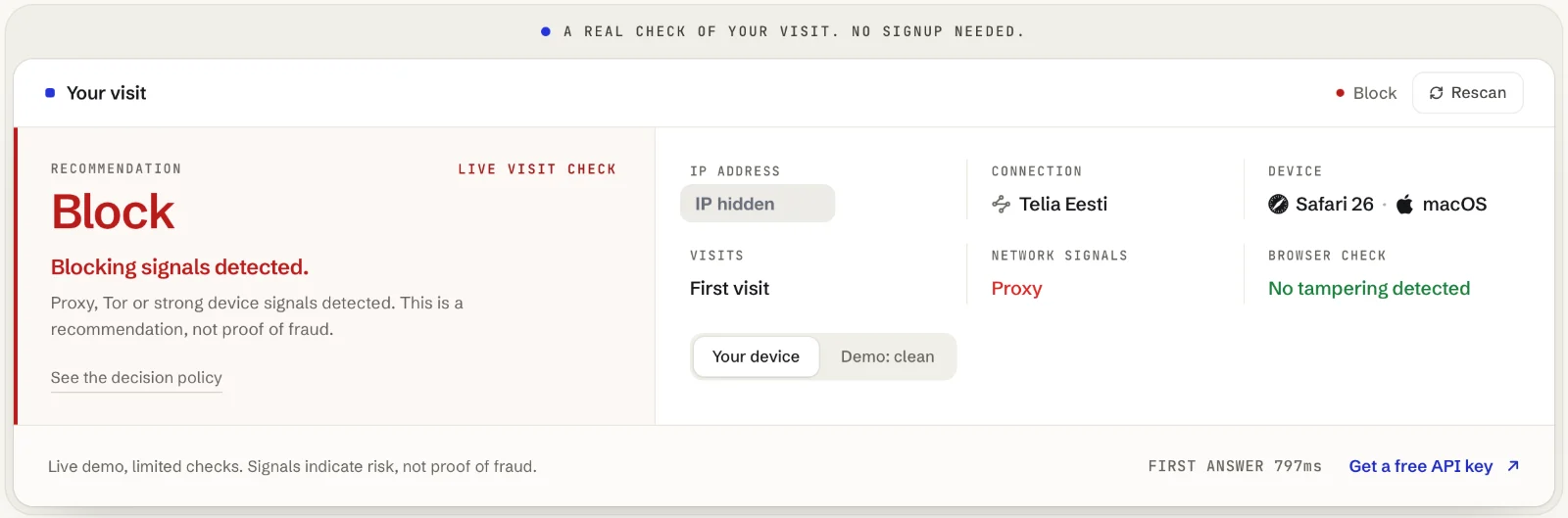
Two limits. A fake browser is built to hand each profile its own device identity, so the account count alone can miss it, and the fake-browser flag can stay false: in the Aurorium test it did, and the device check read the browser as a virtual machine instead, a review.
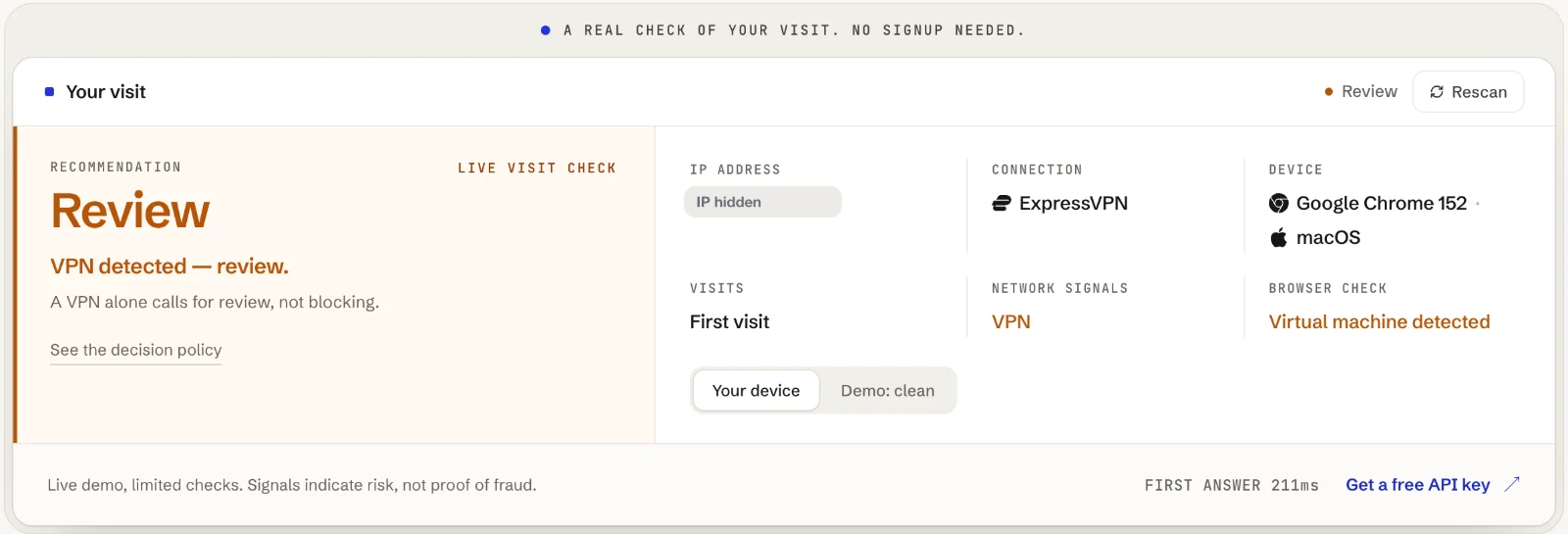
The second limit: a bare-IP lookup, GET /v1/lookup, checks only the Tor exit list and published cloud ranges: it sees no VPN, no proxy and no device, so it cannot replace the browser token at either step.
Run your own signup or checkout traffic through this: the free scanner returns the same verdict the API does.
Open the scannerSignup or redemption: where each check belongs
At signup, decide whether the account should exist. Check the form submission with the new account’s id as accountId. Automation, a fake browser and a proxy tied to a known pool block by default, so once you enforce, a signup the check blocks does not reach a code. A burner inbox goes to review: ask for a working address before the account can hold a discount. Do not pay the welcome discount here; record that the account is eligible.
At redemption, decide whether this account on this device should get this discount. Check again when the code is applied, with the same accountId. Now device.linked_accounts answers what the discount tool cannot: how many of your accounts this device has been behind in the last 90 days. The count covers your accounts only, stored as hashes, never linked across Maskbreak customers (OpenAPI specification). On a first-order discount the order is fine; the discount is the question.
Referral credit is checked when it becomes payable: see catching self-referral before you pay it out. Casino bonuses have their own playbook, iGaming bonus abuse detection.
Three redemption checks and their answers
Each verdict comes from Maskbreak’s own code, run in the /v1/evaluate handler’s order. Fields are a selection; EXAMPLE_POOL and EXAMPLE_VPN stand in for the names network.service carries when known.
1. The fourth account on one laptop. Home broadband, an ordinary browser, a real Gmail inbox with a plus tag. Nothing is wrong except the count:
The reason multi_account_device is evidence, not a verdict: the engine leaves the decision where the network and the browser put it. With Multi-accounting set to Review in the console’s Rules tab, the same check returns:
2. A fifth account on the same laptop, behind a proxy, with a burner inbox.
Fifty points for the proxy and 15 for the burner inbox make the score; the proxy alone makes the block. The Multi-accounting rule matches here too (rule_matched: ["multi_account"]), and the decision stays block because the proxy has no rule of its own.
3. A first order over a VPN. One account, an ordinary inbox, a commercial VPN:
By default a VPN alone is review, not a block: 35 points for the VPN and 30 for the cloud server it runs on. The Multi-accounting rule does not match. The person may simply care about privacy, so offer a step they can pass, such as confirming the order from the account’s inbox.
Turning the account count into a decision
The console’s Rules tab sets one action per signal. Multi-accounting fires when device.multi_account is true, meaning two or more of your accounts on the device, and its default is Allow: the engine’s answer stands. How a rule acts:
- It speaks only for the signal it names. Evidence with no rule of its own keeps its engine weight: a proxy, a Tor exit, automation or a fake browser still blocks, and a VPN, a burner inbox or a time zone mismatch still reviews, never above the engine’s own answer.
- It can raise an answer as well as lower one. Multi-accounting set to Review turns redemption 1’s allow into review; set to Block, into a block.
- It applies to each check your key makes, login included. For a limit at redemption only, compare
device.linked_accountswith your own limit in the handler, as the sample below does. - The response says who decided.
decision_source: "rules"andrule_matchedname the rule;engine_decisionappears when the rule changed the answer.
Prefer Review to Block: two accounts on one laptop can be a couple or a reinstall; four first-order discounts are harder to explain. Pin a real household with “Always allow visitor” on its event page only after a person has looked: the pin allows that device whatever else fires.
Watch first, then enforce
In watch mode the handler runs the check, logs what enforce would do and applies the code anyway. After a few days, compare those lines with the console’s Events, then set MASKBREAK_MODE=enforce. The integration guide covers signup and login; this is the redemption endpoint. The browser SDK adds the monocle, sentinel_fp and sentinel_tz fields to a checkout form with class="monocle-enriched" (for an apply-code call made with fetch, send what Sentinel.collect() returns under those three names); requireSession and applyCodeOnce are your own.
// 'watch' (default): log what enforce would do, always apply the code.
const MASKBREAK_MODE = process.env.MASKBREAK_MODE || 'watch';

app.post('/checkout/apply-code', requireSession, async (req, res) => {
  let v = null, hold = null;
  try {
    const r = await fetch('https://maskbreak.com/v1/evaluate', {
      method: 'POST',
      signal: AbortSignal.timeout(3000),
      headers: {
        Authorization: 'Bearer ' + process.env.MASKBREAK_API_KEY,
        'Content-Type': 'application/json'
      },
      body: JSON.stringify({
        token: req.body.monocle,                  // network half of the visit
        fingerprintEventId: req.body.sentinel_fp, // device half
        accountId: String(req.user.id),           // from your session, never client input
        email: req.user.email,                    // burner check; not stored
        tz: req.body.sentinel_tz                  // device clock vs exit country
      })
    });
    if (!r.ok) throw new Error('Check unavailable');
    v = await r.json();
    if (v.test || v.sandbox || v.sample) throw new Error('No production verdict');
    if (v.decision === 'block') hold = 'refuse';
    else if (v.decision === 'review' || v.degraded || !v.device) hold = 'verify';
    else if ((v.device.linked_accounts || 0) >= 3 // your own limit, at redemption only
      && v.decision_source !== 'exception') hold = 'verify'; // an allow pin skips it
  } catch {
    hold = 'verify';
  }
  console.log('[maskbreak]', JSON.stringify({ mode: MASKBREAK_MODE,
    decision: v?.decision ?? null, reasons: v?.reasons ?? null, enforce_would: hold || 'apply' }));
  if (MASKBREAK_MODE === 'enforce' && hold === 'refuse') {
    return res.status(403).json({ error: 'This code cannot be used on this order.' });
  }
  if (MASKBREAK_MODE === 'enforce' && hold === 'verify') {
    return res.status(409).json({ next: 'verify_then_apply' }); // or full price
  }
  return applyCodeOnce(req, res); // checks and records the use in one statement
});
A block refuses the discount, not the customer: the order can still go through at full price. Missing evidence is a hold, not a pass: a script that posts straight to your endpoint sends no browser token, and Maskbreak fails open with decision: "allow" and degraded: true unless the email check or your rules say otherwise. Maskbreak’s Free plan includes 10,000 visitor checks a month; paid plans start at €29 a month (pricing).
What not to do
- Do not block VPN users. A VPN alone is flagged for review. Refusing VPNs at checkout loses privacy-minded customers and does nothing about a farm on residential proxies.
- Do not trust IP counts alone. Count accounts per device with
accountId; keep IP limits as a coarse backstop. - Do not count devices alone either. Stripe’s
card.fingerprint“uniquely identifies this particular card number” (Stripe API reference), so one card behind four first orders shows up whatever device placed them; for Apple Pay and Google Pay the fingerprint may come from the tokenized number instead. A normalised delivery address does the same for goods. - Do not read
device.times_seenas your account count. It counts sightings in Maskbreak’s shared device history, across customers;device.linked_accountscounts your accounts. - Do not dedupe on the address as typed. Lower-case it, and before counting drop a plus tag where the provider delivers it to the same inbox (Gmail does) and the dots in a gmail.com address; send mail to the address as typed. The API’s email check reads burner domains only.
Coupon abuse at checkout also has a section in fraud detection for e-commerce, and the neighbouring problems have their own pages: bonus and promo abuse, multi-accounting, free-trial abuse and disposable emails.
Questions people ask
- What is promo code abuse?
- Promo code abuse, also called coupon abuse or coupon fraud, is redeeming a promotional discount in a way its terms exclude: the same person taking a first-order or one-per-customer discount again through new accounts and new email addresses, guessing single-use codes with a script, or claiming referral credit by referring themselves. The discount tool usually sees a new customer each time, because it counts customer records and email addresses.
- How do people abuse first-order discounts?
- They give each order a new customer: a new account, a new email address (a burner domain, a plus-tagged or dotted Gmail variant, or a fresh mailbox) and often a new IP address through a VPN or a residential proxy. Careful operators add a fake browser profile per account so each order looks like a new device, and scripts create accounts and try codes in bulk. The machine behind the orders and what its browser does are harder to change, and that is what a live device and network check reads.
- Where should a promo code abuse check run: at signup or at redemption?
- Both, for different questions. At signup, decide whether the account should exist: automation, a fake browser and a proxy tied to a known pool block by default in Maskbreak, and a burner inbox goes to review. At redemption, decide whether this account on this device should get this discount: send your own accountId with the check and read device.linked_accounts, the number of your accounts seen on that device in the last 90 days. Check referral credit when it becomes payable.
- Should I block VPN users from redeeming promo codes?
- No. In Maskbreak a VPN alone returns review, not block: a VPN says how someone connects, not that they are abusing a discount. Ask for a step the person can pass, such as confirming the order from the account’s inbox, or let the order go ahead at full price. Among the signals that block by default are a proxy tied to a known pool, a Tor exit, automation, a fake browser and an emulator.
- Does blocking disposable email addresses stop coupon abuse?
- Only its laziest form. A burner domain is a useful signal: Maskbreak moves an allow to review when the address is on its disposable-domain feed, and checks the address without storing it. But Gmail ignores dots and accepts plus tags, so one real inbox can present many addresses that are not disposable. Normalise addresses before you count them, and count accounts per device rather than per address.
Put the check where the attack enters
One call before signup, login or checkout returns decision, risk_score and the reasons behind them. The Free plan includes 10,000 visitor checks a month, no card required. Start with VPN detection and proxy detection, the network layer most attacks lean on.